


Participant
December 24, 2018
Question

Elements 2019 won't start from Lightroom 6

  • December 24, 2018
  • 1 reply
  • 537 views

Just upgraded to Elements 2018 from 2018.  I bought the upgrade from the Adobe Store.

Now I can't use Elements as the external editor - although it looks set up OK.

When I try to "edit in" Adobe Elements Editor I get this message
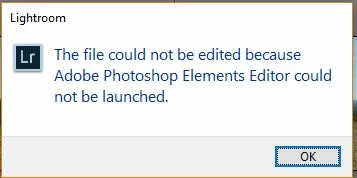
The thing is, it does actually fire up the editor but the image I want to edit doesn't appear in it.

I've tried resetting the external edtor in preferences but it makes no difference.

Not sure if I should post this in the Lightroom forum or this one but I'll start here.

Thanks

    This topic has been closed for replies.

    1 reply

    99jon
    Legend
    December 24, 2018

    Ensure in Preferences that you are pointing to the executable (editor application)

    You can choose this under additional editor if necessary.

    Also it’s best to set prefs to 8 bits/channel as there is limited editing capacity in Elements for 16 bit files.

    When you right click on an image in the LR Library choose Edit in >> PhotoshopElementsEditor.exe

    Participant
    December 24, 2018

    Thank you - I've got the settings as shown on your image - 8 bits, the same external application, PSD file.  It fires up the Editor but the image does not appear in it. 

    And I still get the error message as before - even though its actually launched the editor

    99jon
    Legend
    December 24, 2018

    Are you choosing to edit with lightroom settings?