


Participant
December 3, 2020
Question

Elements 2021 Adjustments Menu Stuck

  • December 3, 2020
  • 2 replies
  • 308 views

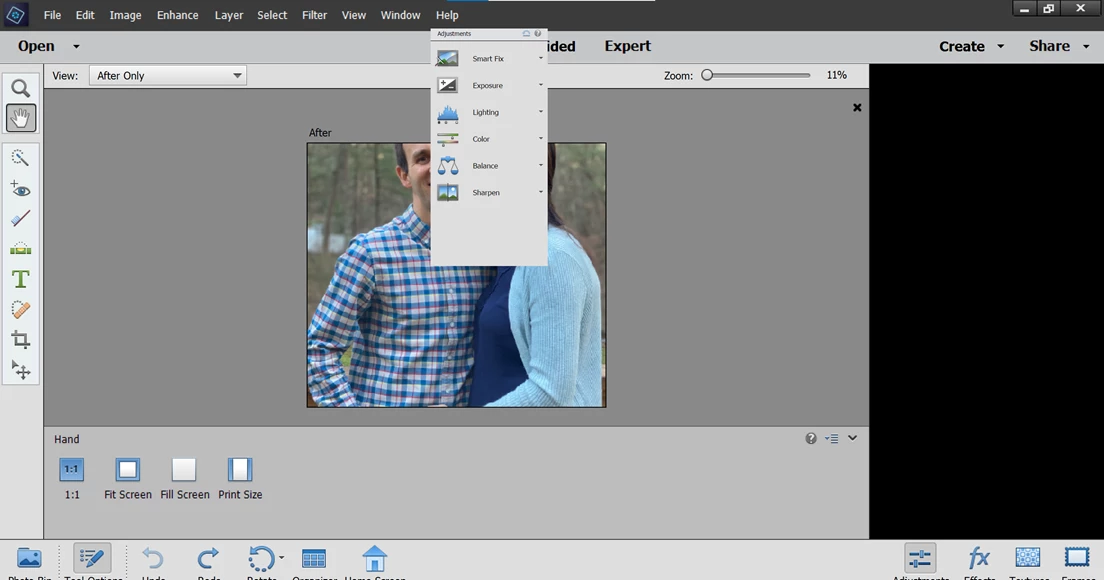
Just installed Elements 2021.  First the menu items were miniscule.  Fortunatley, found a fix on line.  Now when trying to use Guided or Quick Fix a box is stuck in the middle of the screen, obscuring the photo.  Please see the picture included.  I can't find any solution on line.  Please help.
This topic has been closed for replies.

2 replies

Greg_S.
Community Expert
Community Expert
December 3, 2020

. . .  or try toggling the Adjustments panel button in the lower right of the Quick Edit screen.

How did you fix the menu issue?

Do you have auto-hide the taskbar on?  Turn that Windows setting off and see if it makes a difference. 

If none of this works, try resetting the preferences file. Go to Edit>Preferences>General tab and click the Reset Preferences on next launch button.

Peru Bob
Community Expert
Community Expert
December 3, 2020

Have you tried grabbing near the top of the box and moving it?

(left click > drag)