
Participant
November 29, 2020
Question

Elements 2021 and Elements Editor

  • November 29, 2020
  • 4 replies
  • 253 views

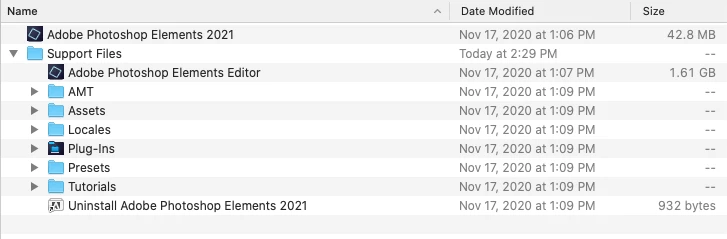
I'm hoping the answer is obvious and I'll apologize in advance for my "newbie" question. I have been using Elements 9 for a decade almost on my old iMac and just recently purchased a new iMac. Purchased Photoshop Elements 2021 after playing with trial version for a few days. Amazing the added features compared to old #9. Anyhow, I have two applications: Adobe Photoshop Elements 2021 and Adobe Photoshop Elements Editor on my dock but in my one of the Apps is in the support folder. When launched they appear to be the same? What am I missing. Thanks.
This topic has been closed for replies.

4 replies

Jeff Arola
Community Expert
Community Expert
November 30, 2020

A shortcut from the Adobe Photoshop Elements 2021 opens the Welcome Screen whereas a shortcut from the Adobe Photoshop Elements Editor opens the Editor directly bypassing the Welcome Screen and the Creative Cloud Desktop application.


Greg_S.
Community Expert
Community Expert
November 29, 2020

I know nothing about Macs and the file/folder structure. 

In Windows, the main desktop icon used to open Photoshop Elements will open the Home screen from which you can open the Editor or Organizer (or Premiere Elements if installed):

The Editor can also be opened directly by clicking on a shortcut icon (which has to be created by the user) or via some other OS methods. 


I assume something similar is available on Macs.


Peru Bob
Community Expert
Community Expert
November 29, 2020

Moved to the Photoshop Elements forum.

Derek Cross
Community Expert
Community Expert
November 29, 2020

Best to post in the Photoshop Elements forum, this is the Photoshop forum.

https://community.adobe.com/t5/photoshop-elements/bd-p/photoshop-elements?page=1&sort=latest_replies&filter=all