


Participating Frequently
December 7, 2022
Answered

elements 2023 organizer sees and downloads two copies of each photo

  • December 7, 2022
  • 3 replies
  • 1527 views

Using Elements 2023 Organizer to download my photos from my camera Fujifilm FinePix S1 on Windows 10. It sees and downloads two copies of everything. Works fine on Elements 2022.

This topic has been closed for replies.
Correct answer Greg_S.

Please show us a screenshot of the Photo Downloader (APD) when this happens.

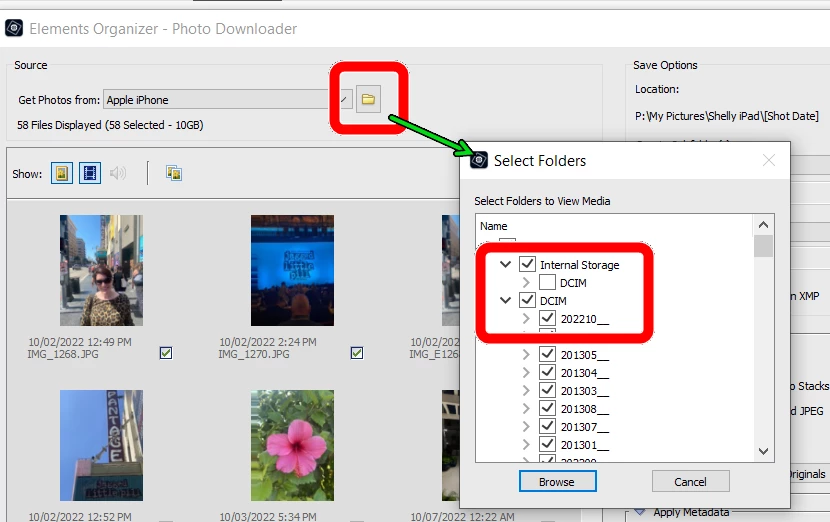
I thought this was only an iPhone problem, but others with cameras have reported it.  If you click on the APD Browse Folders icon, do you see a folder tree with duplicate folders?  In my screenshot below, you will see I have two DCIM folders.  If you have something similar, uncheck one of the folders and this should avoid the duplicates.


3 replies

Participant
February 10, 2023

I have just had similar issues with PS Elements 2023 and all pics were being duplicated. Initially I unticked just the one DCIM but it still downloaded in duplicate. Then tried unticking the most and this seemed to work for me and now only downloads once.


Participant
August 6, 2024

I have the same problem. it is possible to delete a directory, but every time it is painful

Greg_S.
Community Expert
Community Expert
December 10, 2022

When you connect your camera to the computer, are you able to view the camera's folder structure via Windows Explorer?

(Some cameras require a special setting to transfer files to the computer.)


Do you have an SD card reader that you could use to transfer the files?


I realize it may be tedious, but you could uncheck the duplicate copies before importing them.

CLCBunnyAuthor
Participating Frequently
December 13, 2022

Here's the interesting thing. If I use PSE2022 it automatically selects just the DCIM so I never even used the folder select dropdown menu, see screenshot. If I use PSE2023 it automatically selects external memory and DCIM, thereby reading everything twice, see screenshot. So I can fix the problem by always remembering to deselect one. My question - why has this changed?

MichelBParis
Legend
December 13, 2022

I have had a similar experience after a failure of my Samsung S8 smarthone: the USB connector died and I had to change the phone and asked the phone specialists to transfer the data to another phone while I had enough battery power.

The big surprise was the very long time the transfer required.

The reason was mainly that I did store my photo library on the SD card.

The restore process did restore all the photos on the camera together with the transferred SD card. I had also duplicates because I also had copies stored in my Dropbox and OneDrive locations... at least that's what I suspect.

The result was that it was practically impossible to download from the organizer due to the very large number of files that the organizer seemed unable to filter to skip duplicates. Now I am using the phone as an external drive and download only the selected DCIM files on the card (just like from a SD card with a card reader).

I don't know the details about the differences between PSE2022 and PSE2023.


Greg_S.
Community Expert
Greg_S.Community ExpertCorrect answer
Community Expert
December 7, 2022

Please show us a screenshot of the Photo Downloader (APD) when this happens.

I thought this was only an iPhone problem, but others with cameras have reported it.  If you click on the APD Browse Folders icon, do you see a folder tree with duplicate folders?  In my screenshot below, you will see I have two DCIM folders.  If you have something similar, uncheck one of the folders and this should avoid the duplicates.


CLCBunnyAuthor
Participating Frequently
December 10, 2022

I do not get an option to select DCIM or SD for this camera. Also I tested it with no SD card, photos stored in internal memory, and it does the same thing. I tried a Canon Powershot and I do get the Select Folders Dropdown menu for that one.