Nichi25
Participant
July 17, 2024
Answered

Elements 2024 Organizer; Album exportieren

  • July 17, 2024
  • 2 replies
  • 474 views

Adobe Photoshop Elements 2024 und Organizer; macOS 14 Sonoma:


In einem Album vom Organizer habe ich Fotos in der Albumreihenfolge sortiert. Jetzt möchte ich die Fotos in einen neuen Ordner auf die Festplatte exportieren. Die Fotos sollten vor den ursprünglichen Kamera-Dateinamen fortlaufend nummeriert werden. Wie kann ich diese Kombination umbenennen und speichern?

Die Albumreihenfolge muss unbedingt erhalten bleiben da die Fotos verschiedene Dateinamen haben, welche ich behalten möchte.

Vielen Dank für eine Hilfe.

This topic has been closed for replies.
Correct answer Greg_S.

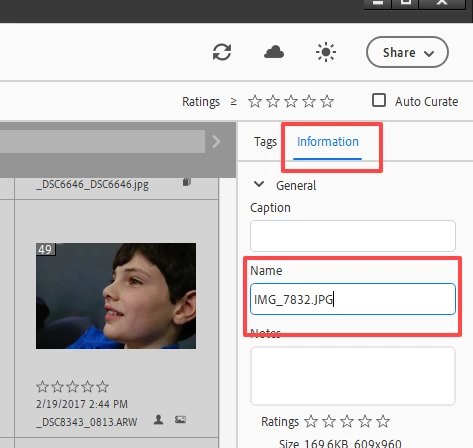
As I understand your question, this cannot be done automatically if you want to maintain the original file name.   However, you can rename the files manually, by selecting each file in the Album and changing the name (for example with a numeric prefix) in the Information panel:


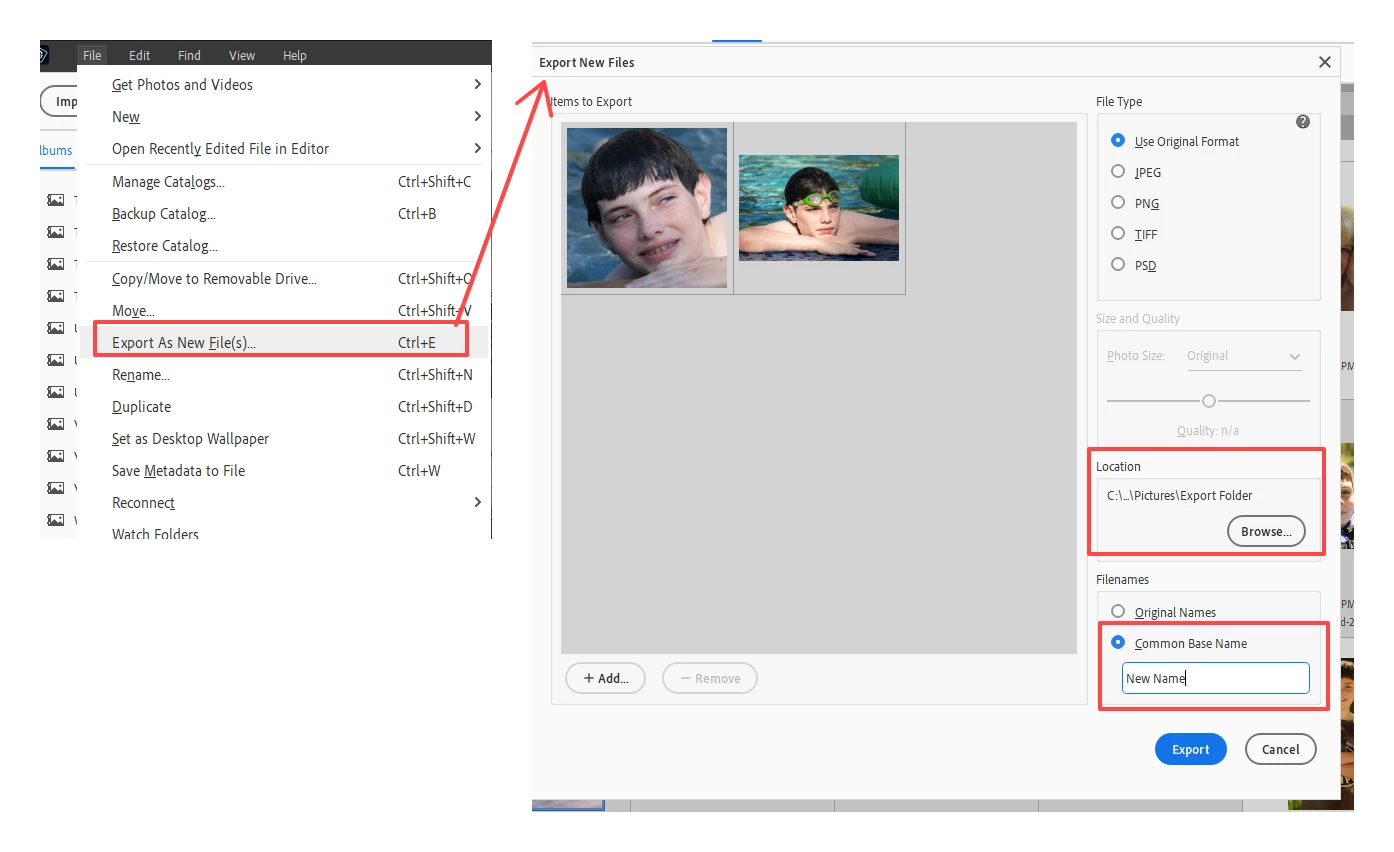
You would then use the File>Export (as new files) menu to select and export the files to a new folder.


However, if you want to perform this operation automatically, you would have give the files a common name such as My Special Album, again using the File>Export (as new files) dialog:


The files will then be saved in your chosen export folder with the common name and a numeric suffix, such as Album Photo -1, Album Photo -2.


Added:  I know nothing about Macs, but I assume this operates in the same way as Windows.

2 replies

Greg_S.
Community Expert
Greg_S.Community ExpertCorrect answer
Community Expert
July 17, 2024

As I understand your question, this cannot be done automatically if you want to maintain the original file name.   However, you can rename the files manually, by selecting each file in the Album and changing the name (for example with a numeric prefix) in the Information panel:


You would then use the File>Export (as new files) menu to select and export the files to a new folder.


However, if you want to perform this operation automatically, you would have give the files a common name such as My Special Album, again using the File>Export (as new files) dialog:


The files will then be saved in your chosen export folder with the common name and a numeric suffix, such as Album Photo -1, Album Photo -2.


Added:  I know nothing about Macs, but I assume this operates in the same way as Windows.

Nichi25
Nichi25Author
Participant
July 18, 2024

Vielen Dank für Ihre Antwort:

"As I understand your question, this cannot be done automatically if you want to maintain the original file name." and

"However, if you want to perform this operation automatically, you would have give the files a common name such as My Special Album, again using the File>Export (as new files) dialog":


Schade kann ich die Fotos nicht automatisch nummerieren und die Dateinamen behalten! 500 Fotos manuel umbenennen braucht viel Zeit. Vielleicht finde ich noch eine andere Möglichkeit. Eventuell eine Albumskopie und auf einen Datenträger senden und schauen was passiert...?

Das Programm Elements 2024 funktioniert sonst sehr gut auf meiem MAC, M1.

Viele Grüsse


Nancy OShea
Community Expert
Community Expert
July 17, 2024

[Moderator moved from Using the Community forums to Photoshop Elements.]


See Creating and Exporting Albums:

https://helpx.adobe.com/elements-organizer/using/creating-albums.html


Hope that helps.


Nancy O'Shea— Product User & Community Expert
Nichi25
Nichi25Author
Participant
July 18, 2024

Vielen Dank für den Link. Leider ist die Seite nicht sehr hilfreich. Viele Grüsse.