
Participant
December 9, 2024
Answered

Elements 2025 Chromatic Aberration

  • December 9, 2024
  • 1 reply
  • 1311 views

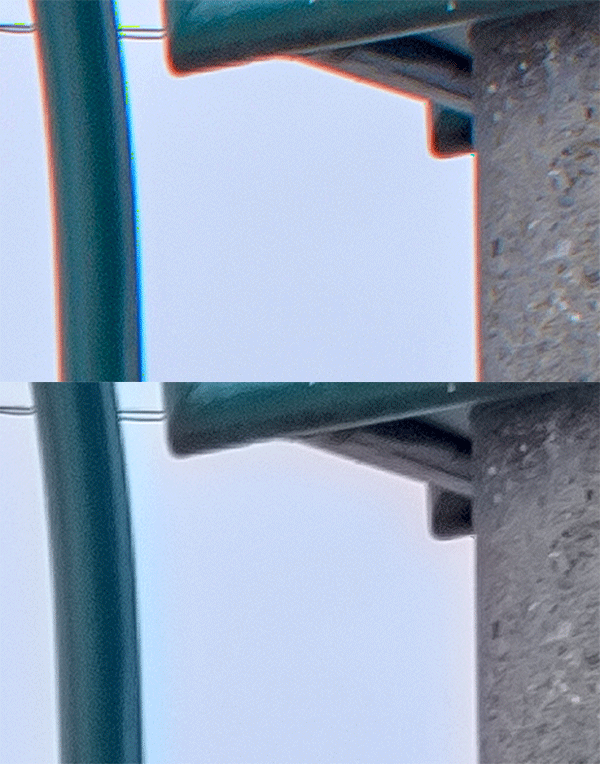
I recently upgraded to Photoshop Elements 2025 for Mac. In doing so, I lost the ability to use the Metaraw Plugin that fixes chromatic aberration. My question is: do you know of a plugin for Elements 2025 that will defringe chromatic aberration? I can't believe Adobe has never put this feature into Camera Raw when using Elements - so frustrating!!! 
This topic has been closed for replies.
Correct answer Greg_S.

There is a very reasonably priced plug-in that will do the job.


But, it's not too difficult to remove chromatic aberation using other techniques.  Here is one:


  • Create a duplicate layer
  • Add a Gaussian Blur sufficient to remove the aberation.  (Your magnified example required a high degree of blur).
  • Change the blend mode to Color
  • Create a mask, if necessary, to bring back any of the photo's color that has been removed by the blend mode.


1 reply

Greg_S.
Community Expert
Greg_S.Community ExpertCorrect answer
Community Expert
December 9, 2024

There is a very reasonably priced plug-in that will do the job.


But, it's not too difficult to remove chromatic aberation using other techniques.  Here is one:


  • Create a duplicate layer
  • Add a Gaussian Blur sufficient to remove the aberation.  (Your magnified example required a high degree of blur).
  • Change the blend mode to Color
  • Create a mask, if necessary, to bring back any of the photo's color that has been removed by the blend mode.


Participant
December 11, 2024

Thanks Greg -  I will give that method a whirl!  And thanks for posting the edited photo example.

- Matt

Participant
December 12, 2024

UPDATE:  was able to minimize chromatic aberation successfully. Thankyou for pointing me in thje right direction.