Known Participant
July 21, 2025
Question

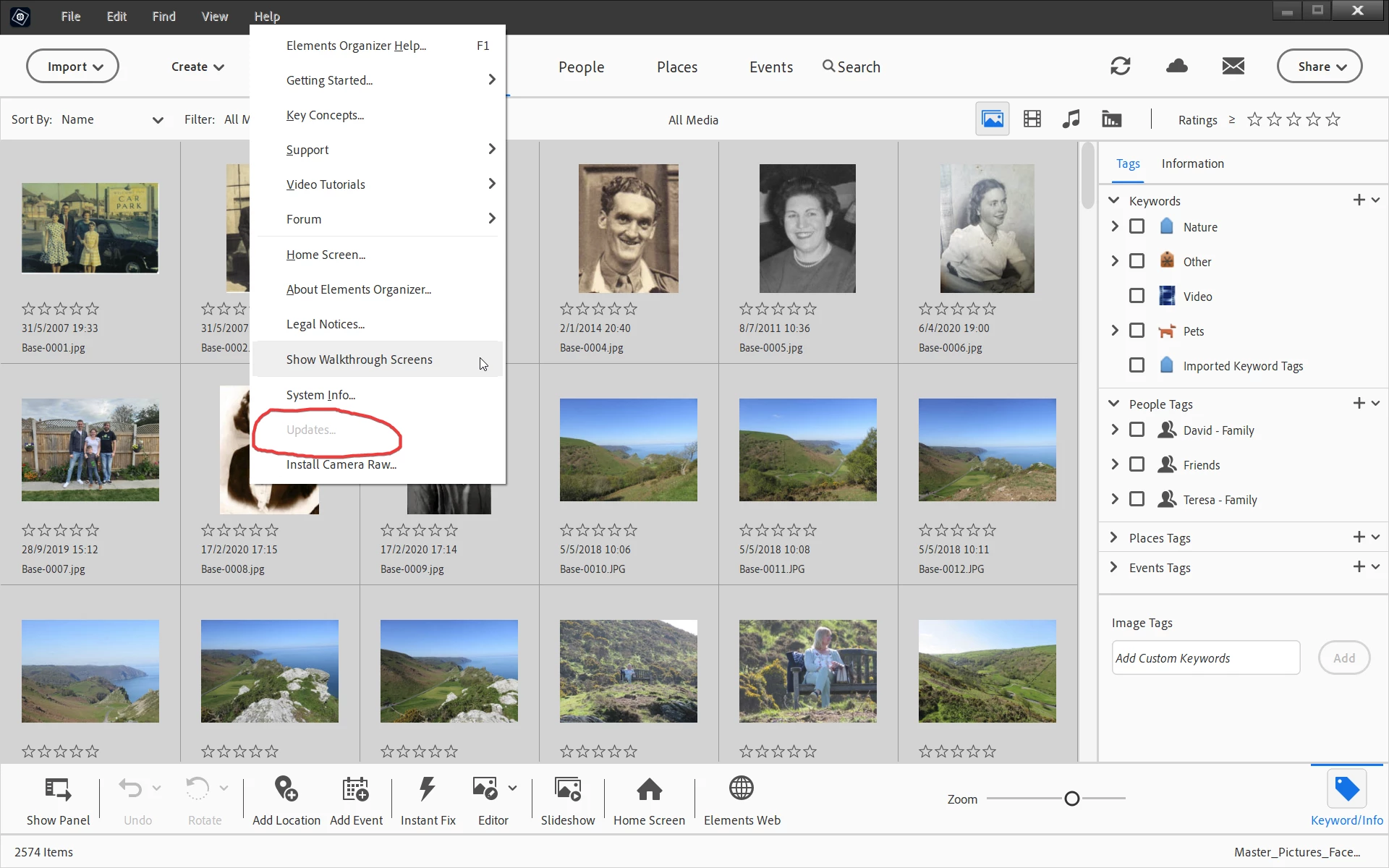
Elements 2025 > Help > Updates is Inactive (Ghosted Out)

  • July 21, 2025
  • 4 replies
  • 404 views

Hi All

For some reason the Updates is ghosted out in the Help drop down. How to I activate this option. I have checked Preferences but nothing there changes what I see.


Many Thanks
4 replies

99jon
Genius
July 21, 2025

This is the latest Adobe link I have:

It shows two updates since original release in October 2024.


https://helpx.adobe.com/photoshop-elements/release-note/update.html


You can always get the latest version from within your Adobe account.

From the Editor menu go to:

Help > Manage My Account


Click on the tab Plans and Payment and choose Products. Scroll to the very bottom of the products page to find the Elements 2025 license.


If necessary, you can download and re-install the latest version at any time  from that link on the products page.

Known Participant
July 22, 2025

Hi 99Jon, seems I have version 25.0 see below.

Elements Organizer 25.0.0.0
Core Version: 25.0 (20250402.EO.8affb1f0)
Language Version: 25.0 (20250402.EO.8affb1f0). So I'm not sure what is going on. I'm in the UK and using your link I can see 25.2 available. Another call to support needed.

Many thanks

99jon
Genius
July 23, 2025

It looks like you are up to date.


Glenn 8675309
Legend
July 21, 2025

Within the editor:  click on HELP then ABOUT PHOTOSHOP ELEMENTS.  As depicted early the popup window indicates the date of the update- which is then made available 1 to two weeks later.   Not all updates are "pushed out" to everyone at the same time- all updates are generally made available to everyone within a few days though.

A new version is going to be available in two orr three months so I would suspect that any updates pushed out now would be "behind the scenes" type of stuff- it wouldn't be any new features.

One exception:  Newer versions of Adobe camera raw can be installed manually- but generally you don't need to worry about those unless your camera requires it.


ACR available in PSE  has less features that the version of ACR found  in Photoshop- some users of PSE think that they will get all the bells and whistles found in ACR that is in Photoshop, and that simply is not the case.

There is no where you can go to and "download the latest update"- with one exception:  Redownloading the PSE program wfrom your Adobe account usually contains the latest version (I actually did that a couple of weeks ago), and it was in fact the latest version.

IF YOU CHOOSE TO DO THAT:  log out off the editor first, then uninstall it.  


Known Participant
July 22, 2025

Hi Glenn, Many thanks, it seems I am not receiving messages about updates. I have 25.0 and 25.2 is available and has been since April. Also the about info states it is Windows 10 version I have when in fact I'm using Win 11 !!??

I'll contact support today.

Jeff Arola
Community Expert
Community Expert
July 21, 2025

In recent versions of Photoshop Elements, Help>Updates only becomes available if there is an update ready to be installed.

Usually though you'll get a notification after you start Photoshop Elements that an update is ready to be downloaded and installed.


You can see the latest updates and how to check if you have the latest using this Adobe KB:

https://helpx.adobe.com/photoshop-elements/release-note/update.html

Known Participant
July 22, 2025

Thank you Jeff, I have 25.0 so something not right as 25.2 has been available since April. I have changed the settings a few times now but no Update message appears? Another support call I guess.

Many thanks.

99jon
Genius
July 21, 2025

It could be that you are already up to date. Launch the Editor and choose Help > About Photoshop Elements - see image.

If you have the April 2025 build; you have the latest version. That will also give the latest version of Organizer.


Otherwise check Preferences > Updates

Ensure you have selected automatic updates or notifications of updates.
