Participant
June 2, 2017
Answered

Elements 8, downloading to Win 10

  • June 2, 2017
  • 2 replies
  • 464 views

I need to move Elements 8 which is currently running on Win 10 upgrade to a new Win 10 computer.

The program loads and EDIT will work but ORGANIZE gets a error message to instal Directx.

I have installed Directx which is also included in Win10 but cannot get by the error message. I have tried to

run Windows in Win 7 mode with the same result. Help please.

Bruce

Ottawa

This topic has been closed for replies.
Correct answer Dhananjay Sati

Hi brucebrannen,

Thanks for posting in Adobe forum.

I understand you are facing issue with Adobe Photoshop Elements 13 due to DirectX.

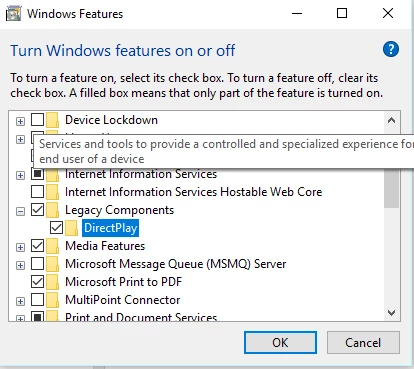
Can we follow the following steps:

- Click "Start Button"

- Type "Turn Windows Feature On & Off"

- Open it

- Check for "Legacy Components"

- Click the + sign

- Check "Direct Play"

- Click "Ok"

- Check Adobe Elements

Hope this works

Thanks

Regards

Dhananjay

2 replies

Participant
June 3, 2017

Thanks for your help....right on! You made my day.

Bruce

Ottawa

Dhananjay Sati
Participating Frequently
June 3, 2017

Hi brucebrannen ,

I am glad it helped you. You can mark it as helpful by clicking the "Star" icon.

Thanks

Regards

Dhananjay

Dhananjay Sati
Dhananjay SatiCorrect answer
Participating Frequently
June 2, 2017

Hi brucebrannen,

Thanks for posting in Adobe forum.

I understand you are facing issue with Adobe Photoshop Elements 13 due to DirectX.

Can we follow the following steps:

- Click "Start Button"

- Type "Turn Windows Feature On & Off"

- Open it

- Check for "Legacy Components"

- Click the + sign

- Check "Direct Play"

- Click "Ok"

- Check Adobe Elements

Hope this works

Thanks

Regards

Dhananjay