Known Participant
Aug 10, 2017 11:43 AM UTC
Answered

Elements 8 won't open

I've just been directed to this thread by a link sent to me from the Apple Community.

I have a similar problem in that, although I can open and work with the P.S.E.8 application, my problem is that the workspace background area is solid black and I used to be able to change it to clear, so my desktop could be seen in it.  The options used to be somewhere in the preferences but I don't see it anymore.

Can you please help?  Thank you.

makey.
    This topic is closed to new replies. Start a new post to keep the conversation going.
    Jeff Arola
    Jeff ArolaCorrect answer
    Community Expert
    Aug 11, 2017 5:30 PM UTC

    You don't need to reset your preferences or reinstall pse 8.

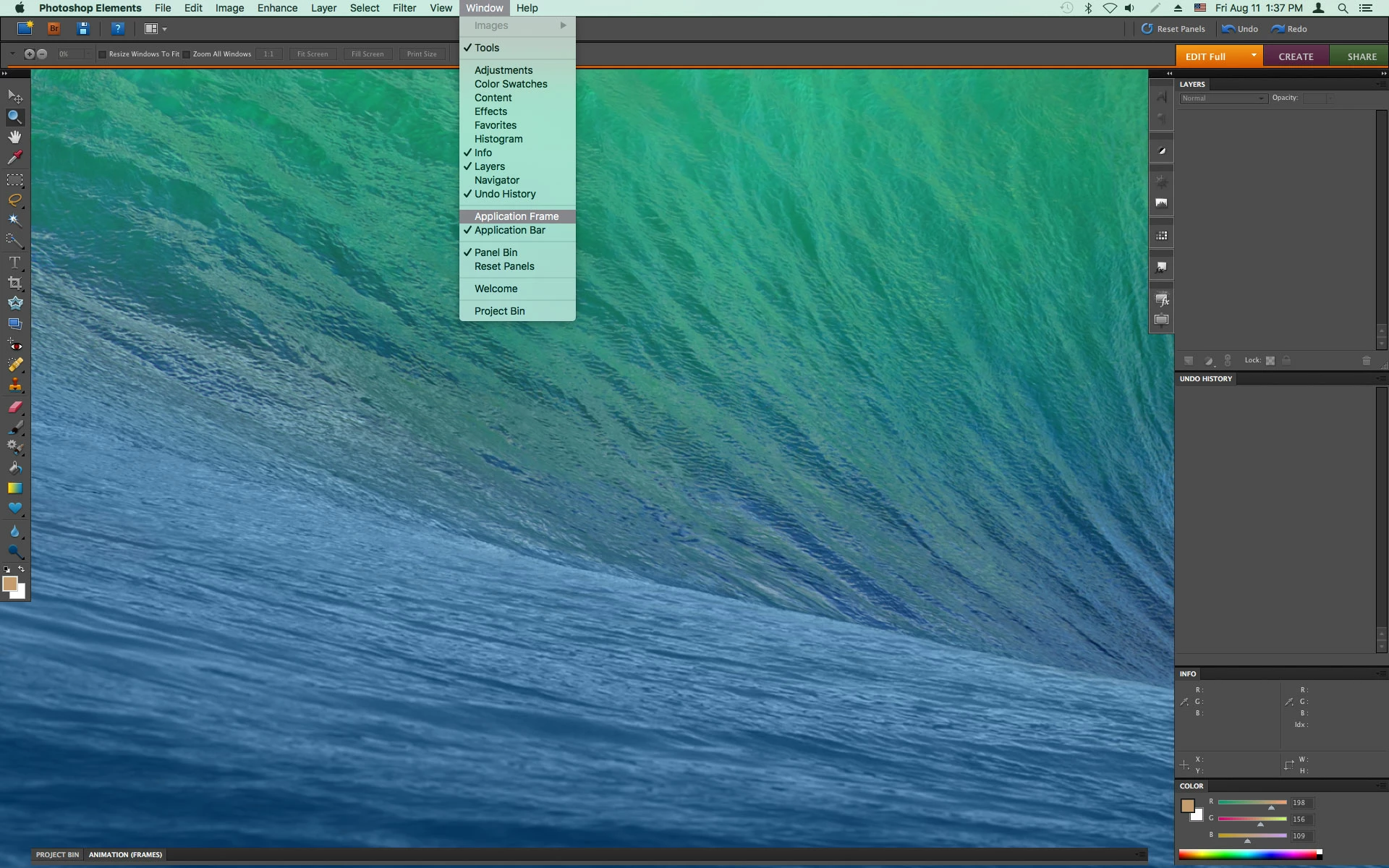
    In the pse 8 editor go to Window>Application Frame

    Click on the words Application Frame to turn it off so you can see your desktop.

    13 replies

    hatstead
    Inspiring
    Aug 11, 2017 2:34 PM UTC

    trevsy  wrote

    The workspace background area is solid black and I used to be able to change it to clear, so my desktop could be seen in it. 

    In PSEv.8, open a picture file

    Drag the corner handle to get to the workspace behind the picture

    Right click on the workspace and change the color. I leave mine gray.

    Translate
    trevsyAuthor
    Known Participant
    Aug 11, 2017 3:01 PM UTC

    Thanks for your reply.

    It seems I can't get rid of the solid black area, but as my mouse hasn't got a right click facility I tried using the alt key to change the colour and nothing works.  I can't see anything in Preferences to do anything with the workspace area.

    makey (that's me, trevsy).

    Translate
    hatstead
    Inspiring
    Aug 11, 2017 4:23 PM UTC

    trevsy  wrote

    Thanks for your reply.

    It seems I can't get rid of the solid black area, but as my mouse hasn't got a right click facility I tried using the alt key to change the colour and nothing works.  I can't see anything in Preferences to do anything with the workspace area.

    makey (that's me, trevsy).

    Can you post a screen shot of what you see as it pertains to above referenced black area?

    Do you see anything like this?

    Translate
    trevsyAuthor
    Known Participant
    Aug 11, 2017 10:46 AM UTC

    I've tried everything you suggest but I don't know how to implement the procedures.  I inserted my original P.S.E.8 install disk but I don't understand how to go from here.  These are the results after loading the CD:-

    I find using the LIBRARY information very complicated, I tried moving the .plist to the Trash but got no further.

    Please help, my technical ability is VERY limited.

    makey.

    Translate
    kglad
    Community Expert
    Community Expert
    Aug 11, 2017 1:13 PM UTC

    use google to help learn how to use finder to locate the folder/files needed to reset your preferences.

    Translate