nikrol
Participant
April 6, 2024
Answered

Elements Editor lässt sich nach einem Update wegen Fehlenden DLL nicht mehr starten.

  • April 6, 2024
  • 5 replies
  • 3163 views

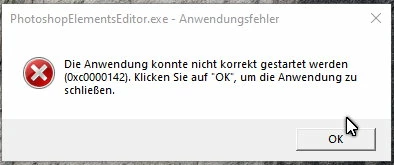
Nach dem heutigen Update von Photoshop Elements 2024 kann ich den Elements Editor nicht mehr starten. Gestern konnte ich mit ohne den Update normal arbeiten.

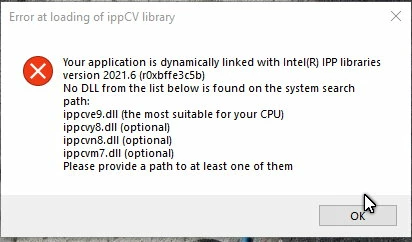
Es fehlt DLL. Habe Windows 10 Pro mit allen neuesten Updates
This topic has been closed for replies.
Correct answer Werner36580269czon

My example for support by Adobe:

Contact us - get help from real people. ???

When you cliick on the button - the new window open:

Adobe "virtual" Assistent

Where is the REAL people ????


See this post here by Harry366 for a fix until Adobe issues an update. This installs the unpatched version of PE 24. I followed the procedure and can confirm that this fix works. Thank you everybody in the community for getting this info to us!

https://community.adobe.com/t5/photoshop-elements-discussions/pe-2024-editor-wont-open/td-p/14543447

5 replies

Jeff Arola
Community Expert
Community Expert
April 9, 2024

Yes we are trying to find out from Adobe if they changed the system requirements for Photoshop Elements 2024, cause like you pointed out, the present system requirements only specify SSE 4.1

https://helpx.adobe.com/photoshop-elements/system-requirements.html


The error message coincides with SSE 4.2 support and not a Processor Generation requirement, but until Adobe

comments we don't really know.


It would also be good to contact Adobe support and let them know of the issue.

 contact Adobe Support.

McNewman
Participant
April 9, 2024

Der Adobe Support ist ein Witz, man klickt sich durch die Webseiten und landet immer wieder beim virtuellen Support der einen nicht versteht, tolle KI Welt. So einen Support für ein Weltunternehmen = Note: 6

McNewman
Participant
April 9, 2024

My example for support by Adobe:

Contact us - get help from real people. ???

When you cliick on the button - the new window open:

Adobe "virtual" Assistent

Where is the REAL people ????


Participant
April 8, 2024

I have exactly the same issue. After the most recent update of photoshop elements 2024 this message started popping up. The organizer still functions. Before this update PE 2024 editor worked just fine as well. My CPU is (intel i5-2500K) is SSE 4.2 comptabile so that shouldn't be the issue) I could uninstall and reinstall Photoshop elements once but then the update auto applied again => now an uninstall and reinstall doesn't work anymore.  (maybe the installer now immediately installs the updated version).  I see no information about new hardware requirements for the updated version anywhere.  I'm not that familiar with the Adobe eco system (one of my family members uses this software). I hope this is the right place to ask but where can we get some official help from Adobe (i'm having a very difficult time actually finding any contact information). I played around abit with different intel IPP dlls (the latest version but also both 2021.6 package versions I found using nuget) and dropping them in the installation directory of PE 2024. This all resulted in a dead end for now. This doesn't help anybody immediatly but at least you know others have the problem as well. Will keep on looking for solutions and give feedback if I end up finding one.

Participant
April 8, 2024

well a look at the official system requirements now for PE 2024 points to this

Windows

  • Intel 6th Generation or newer processor or AMD equivalent with SSE4.1 support


An i5-2500K certainly isn't 6th Gen. Maybe they just decided the actually enforce this now.  Is there a way to install the PE2024 version from before the update? (The download button only offers an "online" installer .exe which just downloads from inet)

Jeff Arola
Community Expert
Community Expert
April 7, 2024

Is the Photoshop Elements 2024 update (version 2024.2) what you had installed that brought on that error message?


If your computer is old enough, then the computers processor might not support the SSE 4.2 instruction set extension, which is what the error message most likely is for.

Participant
April 8, 2024

Ich hab das selbe Problem. Anstatt zu sagen das der PC zu alt ist, solltet ihr sagen wie man das Programm wieder gestartet bekommt. Ging ja vorher am selben PC auch.

Jeff Arola
Community Expert
Community Expert
April 8, 2024

I was asking about the age of the computer to see if it's actually a problem with the computer not having

SSE 4.2 or a bug in the Photoshop Elements 2024 update (version 2024.2).


If you know the processor model you can search the internet for the specs.


Unfortunately, on Windows systems checking for SSE 4.2 support either requires an program like Photoshop Elements that lists SSE 4.2 under Help>System Info or a third party utility like CPU-Z.


On the Mac side with Intel processors, a simple Terminal command lists the CPU info

sysctl machdep.cpu


You can fix it by reinstalling Photoshop Elements 2024 and then not letting it update to version 2024.2

In the Photoshop Elements editor you can go to Edit>Preferences>Application Updates and check Notify me when an update is available and check Enable "Remind me Later" for updates.


Jeff Arola
Community Expert
Community Expert
April 6, 2024

Here's the info about the Photoshop Elements 2024 update (version 2024.2)

https://helpx.adobe.com/photoshop-elements/release-note/update.html

nikrol
nikrolAuthor
Participant
April 7, 2024

Steht hier was brauchbares drin? Sehe es nicht.

Jeff Arola
Community Expert
Community Expert
April 6, 2024

It certainly looks similar to the message users were getting when Photoshop started requiring CPUs with SSE 4.2

here under Error at loading of ippCV library

https://helpx.adobe.com/de/photoshop/kb/known-issues.html

https://helpx.adobe.com/photoshop/kb/known-issues.html


How old is your computer?


nikrol
nikrolAuthor
Participant
April 7, 2024

Tag  vor dem Update habe ich mit dem Editor gearbeitet. Dann kam die Meldung, dass Update heruntergeladen werden kann. Den habe ich durchgeführt. Elements Organizer konnte ich problemlos starten, beim Editor kam dan diese Fehlermeldung.

Was hat es mit dem Alter des Computers zu tun? 

Im übrigen habe ich die Version vor dem Update installiert und siehe da, es funktioniert wieder.