
Inspiring
October 8, 2017
Answered

Elements Organiser 2018?

  • October 8, 2017
  • 1 reply
  • 1030 views

How do I simplify masses of full folders taking ages to sort out in new Organiser?

I updated from Photoshop Elements 2016 yesterday and imported my photographs.  I now have about 100 folders with weird names that are full of photos and which are taking me ages to sort out.  I'm thinking of giving up and sticking with Mac Photos but it seems to shame not to give this program a go.

Is it best to just upload one folder from my hard drive at a time or is there a simple way to do it all at once?

Many thanks for your help

Paul
This topic has been closed for replies.
Correct answer arshla jindal

Hi Paul,

Thanks for reaching out to us.

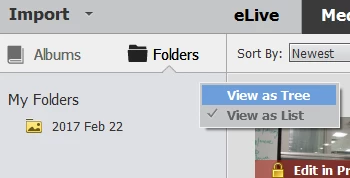
When you import images in Organizer, the folders you see are the ones from which the images are present in Organizer, in the same hierarchy as present on original source of import (hard drive in your case). I would suggest you to switch to Tree View in Folders Panel for better look of the hierarchy of folders. For this click on the small widget at top right corner of Folders panel (at left of the screen) and select "View as Tree".

Is it best to just upload one folder from my hard drive at a time or is there a simple way to do it all at once?

You can select a parent folder having all your subfolders in it to import from all of them at one go. Please see Import media from files and folders in Elements Organizer .

You can access more resources from Help Menu in Organizer.

Please let me know in case you have further queries.

Thanks,

Arshla

1 reply

arshla jindalCorrect answer
Adobe Employee
October 9, 2017

Hi Paul,

Thanks for reaching out to us.

When you import images in Organizer, the folders you see are the ones from which the images are present in Organizer, in the same hierarchy as present on original source of import (hard drive in your case). I would suggest you to switch to Tree View in Folders Panel for better look of the hierarchy of folders. For this click on the small widget at top right corner of Folders panel (at left of the screen) and select "View as Tree".

Is it best to just upload one folder from my hard drive at a time or is there a simple way to do it all at once?

You can select a parent folder having all your subfolders in it to import from all of them at one go. Please see Import media from files and folders in Elements Organizer .

You can access more resources from Help Menu in Organizer.

Please let me know in case you have further queries.

Thanks,

Arshla

Inspiring
October 9, 2017

Many thanks Arshla - that helped a great deal

Kindest regards

Paul