
Known Participant
July 27, 2023
Answered

Elliptical marquee tool-won't outline

  • July 27, 2023
  • 1 reply
  • 760 views

I am attempting to create an outside outline of an ellipse created with the Elliptical marquee tool in Photoshop Elements 2020.  Nothing happens.  In the past, I have been able to create the outside outline by right clicking and selecting "Stroke (outline) selection".  Suggestions?
This topic has been closed for replies.
Correct answer Greg_S.

It's not clear from your post as to whether the problem is with drawing the selection with the eliptical marquee tool or with drawing the stroke. 

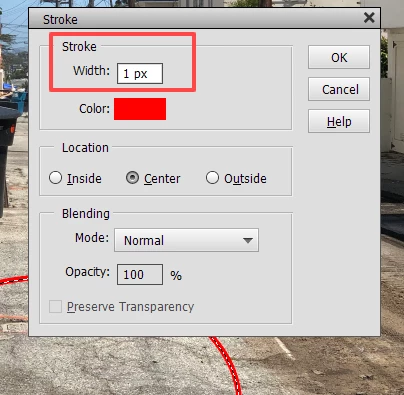
Sometimes, the default width of the stroke is too small to be seen, particularly on a high resolution photo.  So make sure that the stroke is a sufficient width.

If the problem is that the eliptical marquee tool is not working, try resetting the preferences file. Go to the Edit>Preferences>General tab and click the Reset Preferences on next launch button.

1 reply

Greg_S.
Community Expert
Greg_S.Community ExpertCorrect answer
Community Expert
July 27, 2023

It's not clear from your post as to whether the problem is with drawing the selection with the eliptical marquee tool or with drawing the stroke. 

Sometimes, the default width of the stroke is too small to be seen, particularly on a high resolution photo.  So make sure that the stroke is a sufficient width.

If the problem is that the eliptical marquee tool is not working, try resetting the preferences file. Go to the Edit>Preferences>General tab and click the Reset Preferences on next launch button.

Known Participant
July 28, 2023

Problem resolved; resetting preferences worked.