
Participating Frequently
November 19, 2021
Answered

Enhance one colour

  • November 19, 2021
  • 3 replies
  • 692 views

Hi, I hope someone can help. I was going through some older pictures that I took in a wooded area that had a carpet of bluebells. However the photos i took dont do it justice and the flowers dont look anywhere near as bright and colourful. Is there anything that I can do to bring out the blue of the thousands of flowers, without affecting the other colours ?

Thanks for any advice
This topic has been closed for replies.
Correct answer Jeff Arola

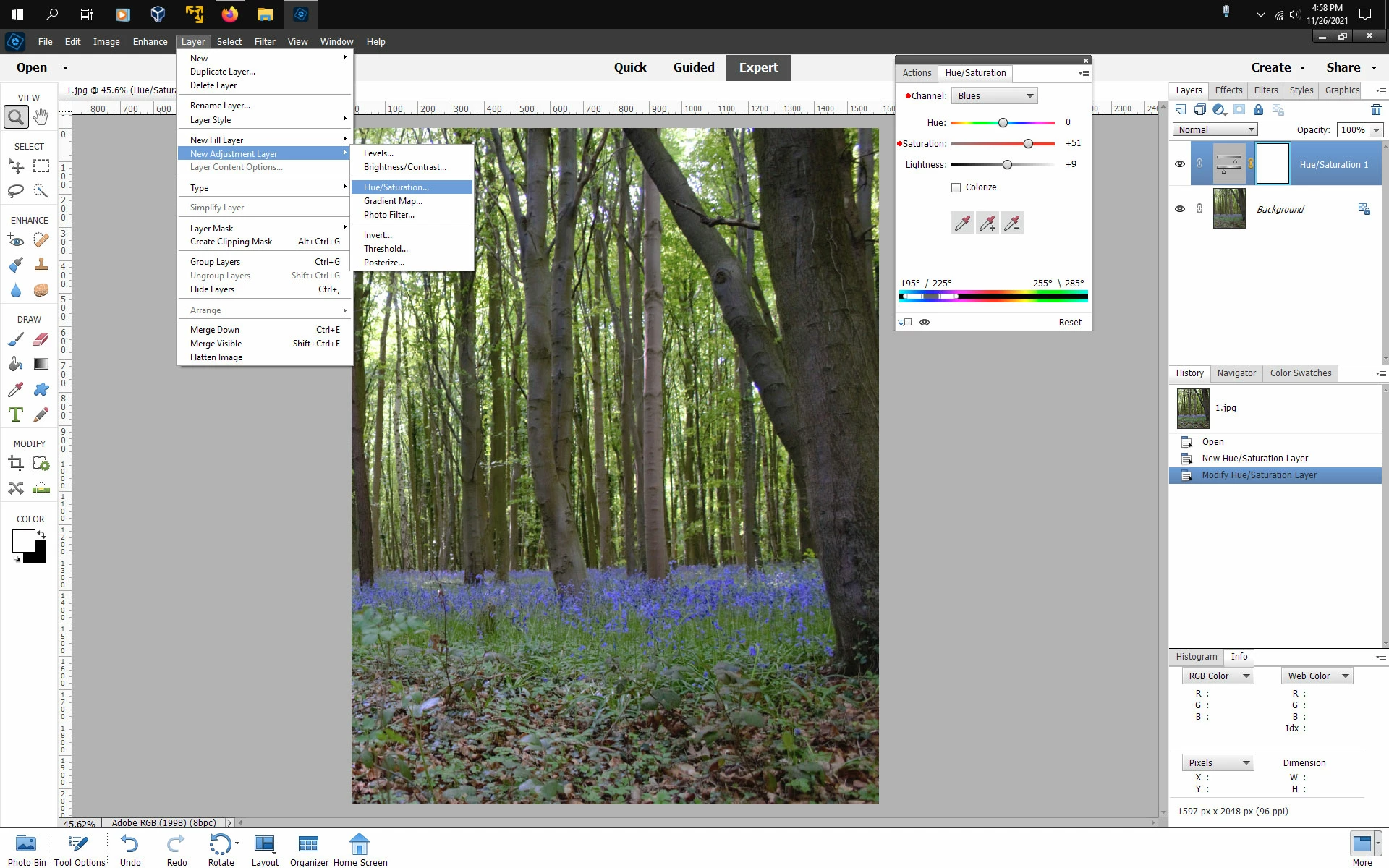
You can use an Hue/saturation Adjustment Layer (Layer>New adjustment Layer>Hue/Saturation) select Blues from the Channel menu and then adjust the Saturation slider for the desired effect.


3 replies

Participating Frequently
November 25, 2021

Thanks very much for your comments. It is appreciated.

Here is one of the pictures, that shows the bluebells, not looking very blue.

Thanks!

Jeff Arola
Community Expert
Jeff ArolaCommunity ExpertCorrect answer
Community Expert
November 26, 2021

You can use an Hue/saturation Adjustment Layer (Layer>New adjustment Layer>Hue/Saturation) select Blues from the Channel menu and then adjust the Saturation slider for the desired effect.


Greg_S.
Community Expert
Community Expert
November 19, 2021

As hatstead says, it will be helpful to see the photo you want to adjust.   There are several ways to skin this cat, but in general, you will want to select the flowers which probably have a unique color in the photo.  To do this, you will want to use the Magic Wand selection tool.  Make sure that the Contiguous box is unchecked, and you will probably have to play around with the Tolerance slider to get a proper selection of the flowers.


Once the selection is made, there are any number of enhancement tools you can use.  I would suggest that you use a new Hue/Saturation adjustment layer:

This will allow you to adjust the color and brightness of the flowers, something like this:


hatstead
Inspiring
November 19, 2021

Suggest that you post a representative picture for us to look at, so that we may offer targeted advice. You can do that via the "Insert Photos" icon at the top of the reply box here on the forum page.