
Participant
December 6, 2017
Answered

eraser tool "white line" remains

  • December 6, 2017
  • 1 reply
  • 2058 views

I'm using Adobe Pse 14 and I need to know if there Is there a way to use the eraser tool without it leaving  a "white line" on the edge I am erasing? when erasing I've noticed an edge remains (or is created) along the image I'm trying to erase. It is quite obvious and I can't get rid of it, especially when I'm stacking layers or if there is a dark layer beneath it. someone has to of seen this before and I want to know how to keep this from happening. It also happens with all erasers(especially the magic eraser) and all file formats jpeg's,  bmp's, png;s. Has anyone seen this and know how to eliminate it?  Thanks in advance.    C

[Here is the list of all Adobe forums... https://forums.adobe.com/welcome]

[Moved from Photoshop to Photoshop Elements... Mod]
    This topic has been closed for replies.
    Correct answer Jeff Arola

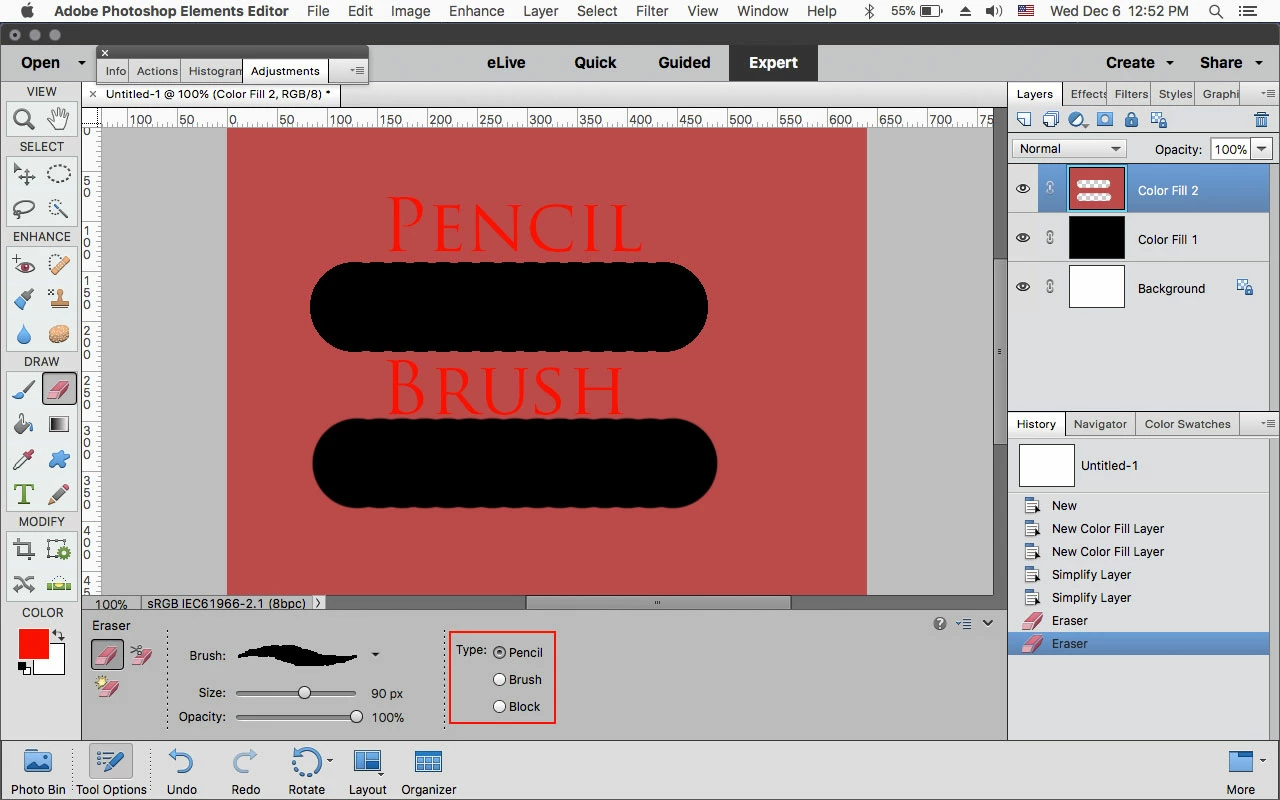
    That might be because normally the Eraser Tool uses a regular brush like the brush tool uses that has some anti alias built in.

    (softening of the edges or a slight feather)

    You could try a 100% hard brush (press the Shift+Left or Right Bracket key to change the Hardness or change the Type to Pencil or Block, both of which have no anti-alias.

    1 reply

    Jeff Arola
    Community Expert
    Jeff ArolaCommunity ExpertCorrect answer
    Community Expert
    December 6, 2017

    That might be because normally the Eraser Tool uses a regular brush like the brush tool uses that has some anti alias built in.

    (softening of the edges or a slight feather)

    You could try a 100% hard brush (press the Shift+Left or Right Bracket key to change the Hardness or change the Type to Pencil or Block, both of which have no anti-alias.

    Participant
    December 6, 2017

    Thanks Jeff for the quick response, you were correct.      C