Participant
January 2, 2019
Answered

"Expand items" not working in PSE 2019

  • January 2, 2019
  • 1 reply
  • 1125 views

I created a version set in PSE 2019 by editing a photo and saving it. I'm viewing just the one photo, not the photo grid. When I right-click on the photo, I see "Version Set" > "Expand items in version set" enabled. I click on "Expand items in version set", but nothing happens - the two photos remain stacked.

Why is this not working? It looks like a bug to me.

Thanks

- richard
This topic has been closed for replies.
Correct answer Greg_S.

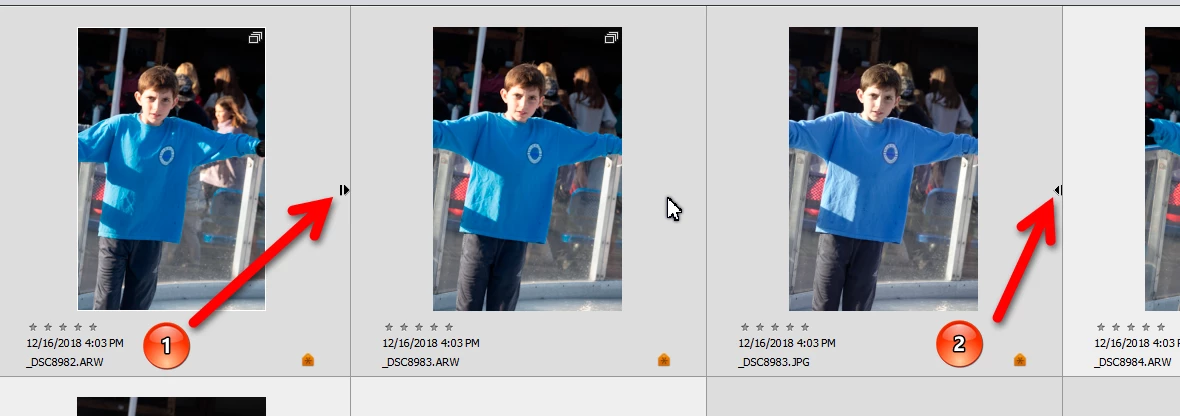
It's working OK in 2019 for me.  If you zoom out to the grid, do you see (1) the stack expand arrow and (2) the stack collapse arrow.

Perhaps you are in the adaptive view (below) where stacks are not visible.  In this case, hit Ctrl+D to get into the details view (above).

1 reply

Greg_S.
Community Expert
Community Expert
January 2, 2019

I believe it is working as designed.  If you expand the stack, you will still be in single image view.  You can move to the next image in the stack in a variety of ways:

  • Page Down/Up
  • Mouse scroll wheel
  • Click on arrow at top of screen:

If you want to compare the images in a version stack, zoom out.

Instead of using the context menu to expand a version stack, simply click on the arrow at the right of the image.

rbc_tnAuthor
Participant
January 2, 2019

Thanks for the quick reply, Greg. What you describe is what I expect to see, but not how it's working for me. When I choose "Expand items in version set" (or "Expand photos in stack"), and then use one of the methods you mention to move to the next/previous photo, I see a different photo, not one of the stacked ones. And I do not see an arrow at the right of the image (although I seem to recall seeing this in previous versions of PSE).

It looks to me like this feature is broken in PSE 2019. Which version of PSE are you using?

Greg_S.
Community Expert
Greg_S.Community ExpertCorrect answer
Community Expert
January 2, 2019

It's working OK in 2019 for me.  If you zoom out to the grid, do you see (1) the stack expand arrow and (2) the stack collapse arrow.

Perhaps you are in the adaptive view (below) where stacks are not visible.  In this case, hit Ctrl+D to get into the details view (above).