
Known Participant
March 3, 2024
Answered

Face recognition: adding new faces

  • March 3, 2024
  • 2 replies
  • 204 views

I am running Elements 2024 under Windows 11 and am going through a large number of scanned slides. I import them in batches e.g. 2000 - 2024, 2015 - 2019 etc. Each batch has its own catalogue. I then create yearly albums within each batch. This allows me to work with one year at a time. I select People and name the faces that appear there. This helps me with tagging individuals, however, sometimes a scanned image will have a face which has not been recognised and as such does not have a name. Can I ask the program in retrospect to scan that image (face) which I can then name.


John McWilliam
Correct answer Greg_S.

@jsmcwilliam@gmail.com said:  Can I ask the program in retrospect to scan that image (face) which I can then name.


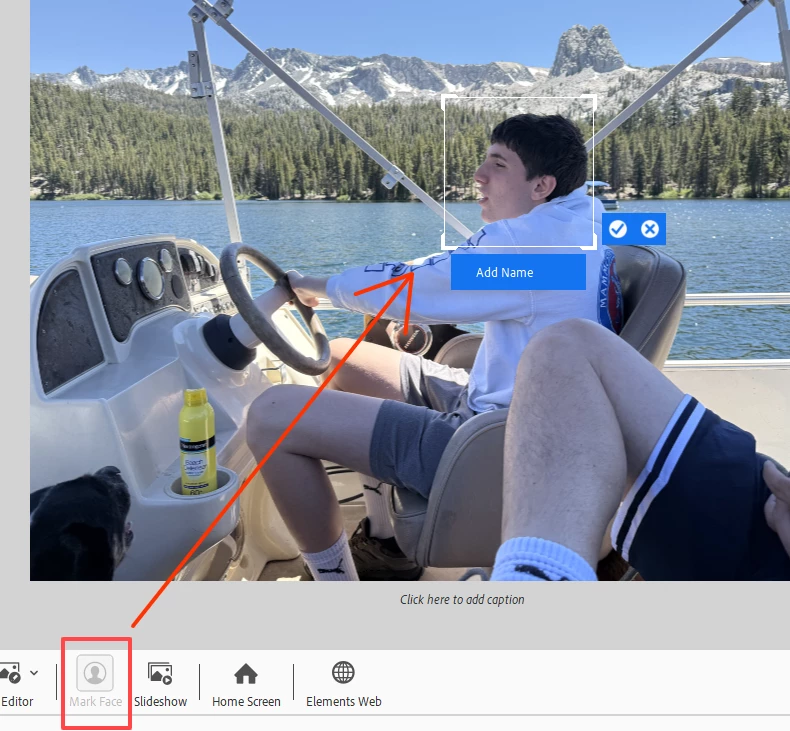
@Donkey6019if the face has been analyzed but not recognized (perhaps because it is not at the right angle for FR to work), the only way to add a name to the face is to double-click the thumbnail in the main grid so the image is in SIV (Single Image View) and to use the Mark Face button to add the face coordinates manually:

If it is not so important to you to have the face displayed in a People tag, you can simply drag the person's People name tag to the image (or vice versa).  In this case, the face will show up in the People stack as a generic icon.

2 replies

Greg_S.
Community Expert
Greg_S.Community ExpertCorrect answer
Community Expert
July 20, 2025

@jsmcwilliam@gmail.com said:  Can I ask the program in retrospect to scan that image (face) which I can then name.


@Donkey6019if the face has been analyzed but not recognized (perhaps because it is not at the right angle for FR to work), the only way to add a name to the face is to double-click the thumbnail in the main grid so the image is in SIV (Single Image View) and to use the Mark Face button to add the face coordinates manually:

If it is not so important to you to have the face displayed in a People tag, you can simply drag the person's People name tag to the image (or vice versa).  In this case, the face will show up in the People stack as a generic icon.

Known Participant
July 21, 2025

Thank you Greg, that first solution solved the problem. Very much appreciated.

Known Participant
July 19, 2025

Hi John, did you ever solve this? I have a similar problem but in Elements 2025.


Thanks