
Participating Frequently
March 28, 2025
Answered

Face recognition on individual picture

  • March 28, 2025
  • 1 reply
  • 232 views

Seems to me that when a picture is wrongly orientated (shown landscape in Organiser when the picture is composed portrait, or vica versa), faces that are clear, but on their side, are not recognised.  

I know I can "Mark Face" - but, when I have re-orientated it, is there a way to ask Photoshop to run face recognition on an individual picture ?
Correct answer Greg_S.

The short answer is: No. However, you can delete a file from the catalog and import it again with the correct orientation.  For a single image, why would you want to do that?  Mark Face would be more efficient.


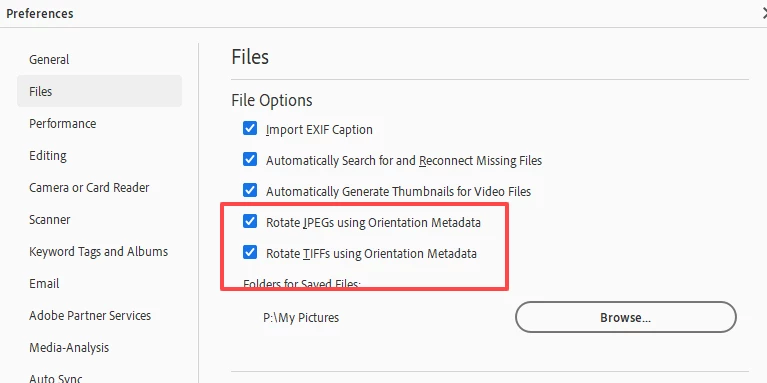
Perhaps a more important question to ask is why are your images not oriented correctly.  Do you have Preferences set to Rotate JPEGs and TIFFs using Orientation Metadata?


In my own experience, the problem occurs with .heic photos from an iPhone, and there is no setting to adjust those photos.  However, if you have to change the orientation of a .heic photo, it will be saved as a jpeg and the saved file should then be face recognized.

1 reply

Greg_S.
Community Expert
Greg_S.Community ExpertCorrect answer
Community Expert
March 28, 2025

The short answer is: No. However, you can delete a file from the catalog and import it again with the correct orientation.  For a single image, why would you want to do that?  Mark Face would be more efficient.


Perhaps a more important question to ask is why are your images not oriented correctly.  Do you have Preferences set to Rotate JPEGs and TIFFs using Orientation Metadata?


In my own experience, the problem occurs with .heic photos from an iPhone, and there is no setting to adjust those photos.  However, if you have to change the orientation of a .heic photo, it will be saved as a jpeg and the saved file should then be face recognized.

Participating Frequently
April 4, 2025

Thank you

Yes I have those two boxes checked, to auto-rotate.   Not sure though where the orientation metadata is, how photoshop knows the camera was tilted.   In some cases I have garnered pictures from other peoples cameras (mobile phones) so perhaps the metadata does not contain orientation data

Would have liked the option as I cannot always remember who the picture is of.  

However, now I know there is no such option, so be it.  Manual marking is no big deal and in any case necessary for side, partial, and back views

Thank you again