
thisisirrational
Inspiring
April 21, 2020
Answered

feature not working

  • April 21, 2020
  • 1 reply
  • 777 views

I just bought Photoshop Elements 2020. I am running into another problem. I detest the new way to do a search.  Now, I figured out how to get the images I'm looking for to show up but heres the problem.  I right click on the image to edit it further and NOTHING happens! I do not get a menue of options, I get nothing. The photo can not be edited. Is there something wrong with the program or is there something I need to do to get that image up in the editor so I can work on it? 
This topic has been closed for replies.
Correct answer Greg_S.

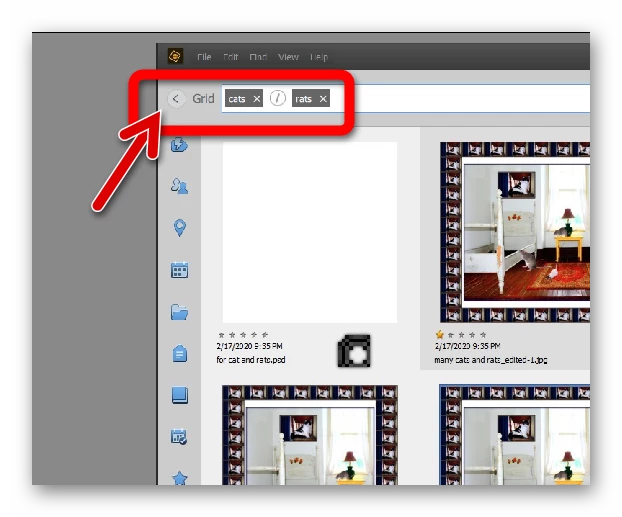
I agree with you entirely about how the Search UI currently works.  What you have to do to work on a search result image is go back to the grid using the button displayed in my screenshot.  The search results will be in a filtered grid and you can then use all commands regularly available in the Media grid.


1 reply

Greg_S.
Community Expert
Greg_S.Community ExpertCorrect answer
Community Expert
April 21, 2020

I agree with you entirely about how the Search UI currently works.  What you have to do to work on a search result image is go back to the grid using the button displayed in my screenshot.  The search results will be in a filtered grid and you can then use all commands regularly available in the Media grid.


thisisirrational
Inspiring
April 21, 2020

thank you, Greg, I will try that.