
Participating Frequently
August 30, 2025
Answered

Finding photos by month and day regardless of year

  • August 30, 2025
  • 3 replies
  • 144 views

I've been trying to use Photoshop Elements 2023 (Windows) to find photos captured on a particular month and day regardless of the year. I've tried the Search feature using text like "August 30" and "8/30" and "Aug 30" and I've tried Find>By details (Metadata)>Capture date. The latter seems to require a year. Any suggestions? Thanks for your attention.
Correct answer Greg_S.

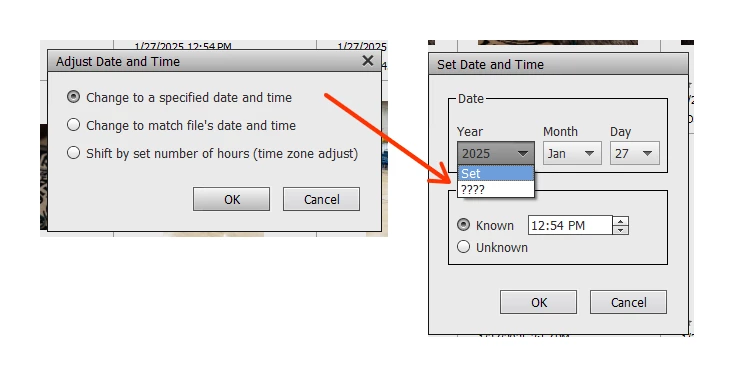
You can adjust the Date and Time of a photo to an unknown day, month or year.  The dropdown dates have question marks to replace the numeric values:


3 replies

Greg_S.
Community Expert
Greg_S.Community ExpertCorrect answer
Community Expert
August 30, 2025

You can adjust the Date and Time of a photo to an unknown day, month or year.  The dropdown dates have question marks to replace the numeric values:


Participating Frequently
August 31, 2025

Thank you, Greg.

Greg_S.
Community Expert
Community Expert
August 30, 2025

Here are a couple of other suggestions.  

  • If the date you are looking for is something like a birthday, go to the Search window and type in Birthday + Smart Tag as your search criteria.  This will bring up all photos that Elements has Smart Tagged with Birthday.  (You also need to click on the Grid arrow button at the left in order to be able to work with those photos.)


  • You can also use the Timeline (Ctrl+L) to quickly scroll to the months that you are looking for.   That should make it easier to find a particular date.


  • If you are intending to group all the photos of a particular (significant) date, you might also create an Album for them when you find them in the grid.
Greg_S.
Community Expert
Community Expert
August 30, 2025

I don't know of any way to do this, which is strange since it is possible to use fuzzy dates in the grid. 


Participating Frequently
August 30, 2025

Greg, can you give me an example of using fuzzy dates in the grid.  Thanks.