Inspiring
July 11, 2020
Answered

First time Elements 2020 User--Type Tool WTF??

  • July 11, 2020
  • 1 reply
  • 402 views

How do I make this annoying dialog box GO AWAY?  When I click on the I bar to add to my previous line of type, it pops up and blocks my view of what I'm trying to type!! As Sheldon from Big Bang Theory asks...what fresh hell is this? I've got all the other upgrades since version 6 pretty much figured out...except this one.  Right now I feel like a clueless Photoshop virgin.  Help. 
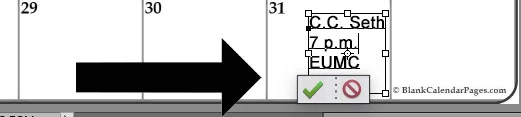


This topic has been closed for replies.
Correct answer MichelBParis

1 - Commit the changes

2 - use the move tool to move up the text rectangle

2 - double click on the icon of the text layer on the layer palette to continue editing. The commit box is under the text rectangle.

3 - commit when satisfied

4 - move tool and down to original location.


The idea is to compose the text layer freely (not constrained by a border) and to move it after on custom destination.

1 reply

MichelBParis
MichelBParisCorrect answer
Legend
July 11, 2020

1 - Commit the changes

2 - use the move tool to move up the text rectangle

2 - double click on the icon of the text layer on the layer palette to continue editing. The commit box is under the text rectangle.

3 - commit when satisfied

4 - move tool and down to original location.


The idea is to compose the text layer freely (not constrained by a border) and to move it after on custom destination.

Inspiring
July 13, 2020
Thank you so much Michel! Your suggestions solved my problem!!
[image:
e8c0e684-92ea-4d8a-b810-775fe270098b-1ff70364-b392-4067-969e-e28488be6f20-v1.png]