Known Participant
November 10, 2017
Question

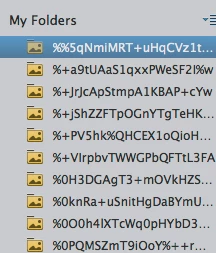
folder names random characters in My Folders list PSE 2018 organizer Mac

  • November 10, 2017
  • 2 replies
  • 1277 views

The file names are nonsense.

How can I fix this?

    This topic has been closed for replies.

    2 replies

    Known Participant
    November 15, 2017

    I figured it out. The file "Photos Library.photoslibrary" was sitting in my import file. Took it out and the organizer seem to be working correctly.

    Adobe Employee
    November 15, 2017

    We're glad that your problem has been solved.

    Have a happy experience using Photoshop Elements!

    Regards

    Arshla Jindal

    Adobe Employee
    November 10, 2017

    Hi Neal,

    Request you to please check if restarting the Organizer helps resolve the issue.

    -Arshla

    Known Participant
    November 10, 2017

    Arshia. Restarting the organizer or the computer does not solve the problem. Here is what Organizer 14 does with the same folders:

    Neal Tobochnik

    nealt@rochester.rr.com

    Adobe Employee
    November 13, 2017

    Hi Neal,

    The folders names that appear here in Organizer are probably the same that exist on your hard drive, which might have been created by some other application.

    Request you to please provide me information on a couple of following pointers:

    • Like the screenshot provided by you above, please provide the corresponding Tree view of folders panel. To do so, click on triangular widget next to My folders header and select View as Tree . Take the screenshot of all folders expanded and post it here. Request you to please open the post in the web browser and then reply. Replying through e-mail would not make your screenshots visible here.
    • Provide me with the File Explorer view of one of these folders. To do so, in Organizer right click one of these folders and select reveal in Explorer . Please keep the file explorer in view which makes it easy to study the path of that folder on hard drive in the screenshot.
    • Also, if possible for you, request you to please confirm, if these folders exist due to iPhotos libraries (do they contain images which might have been imported by you in iPhotos).

    Thanks,

    Arshla Jindal