Participant
December 29, 2021
Answered

Folders imported to Photoshop Elements 2022 automatically and Its not what I wanted.

  • December 29, 2021
  • 2 replies
  • 1093 views

I need to wipe out all folders and start over.  I want to break all the links and have folders dissapear in Organizer so I can reimport the way I want it.  When I opened Organizer for the first time it just started importing all on its own.  Plus it missing pictures in some of the folders.  I just want to start over.


Is there a way?

 

This topic has been closed for replies.
Correct answer Walter_H

Hi Marcia,


On the Organizer Menu bar,

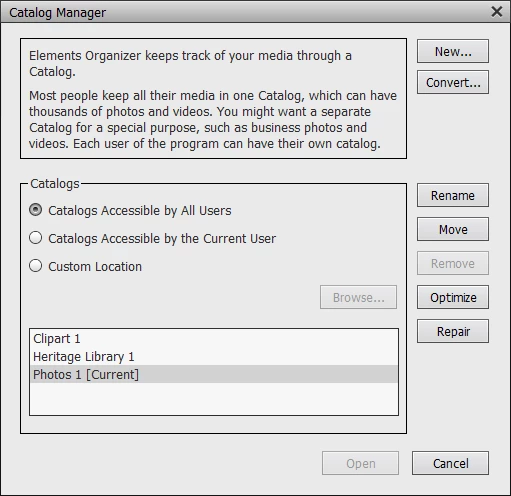
  1. Click FILE > MANAGE CATALOGS.
  2. Create a new catalog and open it.
  3. Import your photos into it the way you want.
  4. After you've imported some photos into the new catalog, you can delete the old catalog.


2 replies

Greg_S.
Community Expert
Community Expert
December 29, 2021

When you import new files into a catalog, it takes a while for the thumbnails to be created (automatically) for each image.  You can bring your image thumbnails into focus by updating them manually.  Select an image or group of images and press Shift+Ctrl+U.

Participant
December 29, 2021

Thank you sooo much.  This is for thumbnails only? As open it to full size & still blurry. I'm in PhotoShop Elements 2022, Organizer.

MichelBParis
Legend
December 29, 2021
quote

Thank you sooo much.  This is for thumbnails only? As open it to full size & still blurry. I'm in PhotoShop Elements 2022, Organizer.


By @Marcia22428927kebq

The thumbnails are saved in two sizes in the thumbnail cache: 240 and 360 pixels max. That means that when you display in full size or bigger than 360 pixels, the full image has to be read and resized. That can take time, especially for raw files which need a new conversion including the edits or with big layered files. Of course, the display speed depends on your hardware specs.

Walter_H
Walter_HCorrect answer
Legend
December 29, 2021

Hi Marcia,


On the Organizer Menu bar,

  1. Click FILE > MANAGE CATALOGS.
  2. Create a new catalog and open it.
  3. Import your photos into it the way you want.
  4. After you've imported some photos into the new catalog, you can delete the old catalog.


--Walter in Davie, FL
Participant
December 29, 2021

Thank You so Much.   Can you answer this question.  After I got the new Folders set up I started opening pictures.  
All of my perfectly focused pictures look as if I didn't focus any of them.  Only in Photoshop Elements 2022.  Well I havn't tried in any other version.  This is my first.   Why are all the pictures out of focus and how do I fix it.