jimohaya
Participating Frequently
December 29, 2021
Answered

Followup to earlier thread about PSE/ACR and Sony A7iv RAW/ARW file, but with PSE 2022

  • December 29, 2021
  • 4 replies
  • 1839 views

Hi,

I had an earlier thread, https://community.adobe.com/t5/photoshop-elements-discussions/photoshop-elements-2021-does-or-does-not-support-a7iv-raw-arw-files-yet/m-p/12619206#M77021, about getting PSE 2021/ACR working with Sony A7iv RAW?ARW files, and, in that thread, I was given a solution that worked for me (by upgrading the ACR in PSE 2021 to ACR 14.1).


One of the users over at another forum was asking about PSE 2022 and Sony A7iv RAW/ARW files, and I had pointed them to that thread that I linked above, but they tried that, and it didn't work.  They have apparently been told that that didn't work because ACR 14.1 is not compatible with PSE 2022. 


Does anyone know if that is correct?


Also, if ACR 14.1 is not compatible with PSE 2022, is the expectation that a later ACR version (e.g., ACR 14.2 or greater) WILL be compatible with PSE 2022?


Or is there NO intention to have an ACR that will work with PSE 2022, and if that case, does that mean that PSE 2022 will never be able to work with the Sony A7iv RAW/ARW files directly?


Thanks!


Jim

This topic has been closed for replies.
Correct answer John Waller

Hi John,


Thanks for the explanation!  I have a couple of questions:


1) As mentioned earlier, I was able to get PSE 2021 working with ACR 14.1, but when I open an ARW file in PSE, what I see looks different than the screen shot you posted (see below).  Is that because your screenshot was with PSE 2022 (vs. mine being with PSE 2021)?  This is what I see when I open a Sony A7iv ARW in PSE 2021 now:
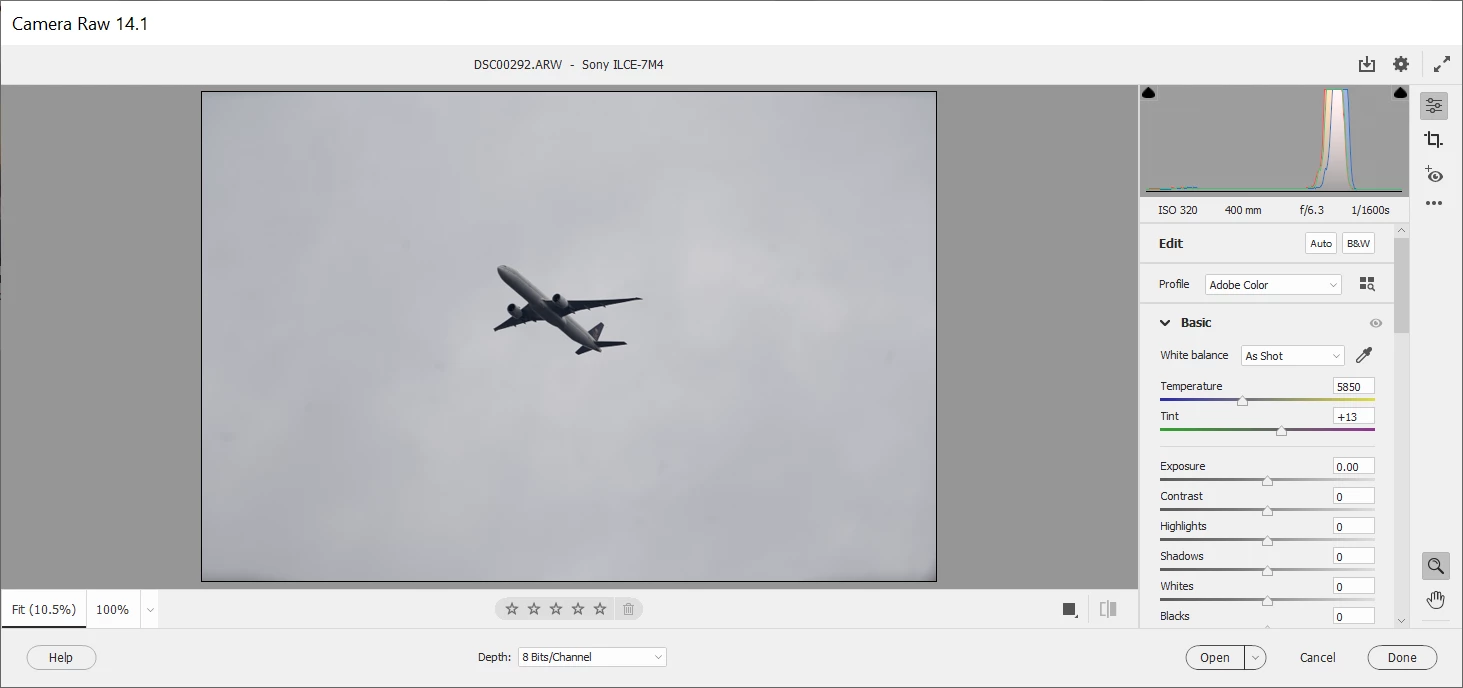
 

Notice that I don't get the items on the top like File, Edit, etc. like the screenshot you posted?


2) One of the things that I found confusing when I updated the ACR to 14.1 in my PSE 2021 was that the steps in the link refer to directory that has something like "Elements<VERSION NUMBER>"


  • Navigate to the following folder: 

    • On macOS: /Library/Application Support/Adobe/Plug-ins/Elements<Version Number>/File Formats
    • On Windows: C:\Program Files\Common Files\Adobe\Plug-Ins\Elements<Version Number>\File Formats
  • Replace the existing Camera Raw plugin in Elements<Version Number> folder with the plug-in that you copied in step 8.


But, like I said, I have PSE 2021, but the path I see in my system is NOT "Elements 21", but rather I see "Elements 19":
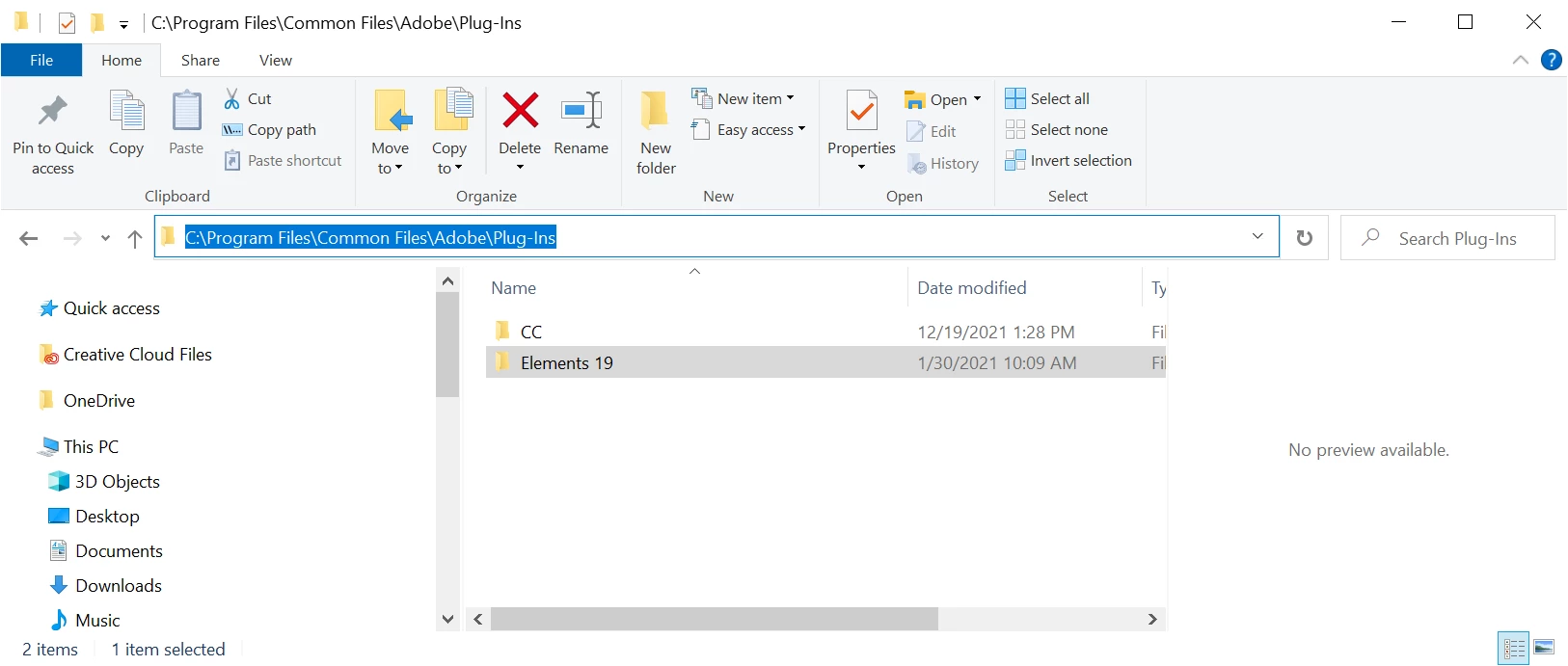


Why is that?  Is it because when I upgraded to PSE 2020 and to PSE 2021, I just ran the installers, and it just kept the original directory name "Elements 19"?


3) Also, the snippet above from the instructions is a little confusing when it says:


"Replace the existing Camera Raw plugin in Elements<Version Number> folder with the plug-in that you copied in step 8."


but actually, I had to put the plugin .8bi file into the "...\Elements<Version Number>\File Formats" folder, to get ACR 14.1 working (I did understand the instruction, but it was a little confusing the way that it was worded).


Thanks,

Jim


quote

but when I open an ARW file in PSE, what I see looks different than the screen shot you posted (see below).  Is that because your screenshot was with PSE 2022 (vs. mine being with PSE 2021)?

Notice that I don't get the items on the top like File, Edit, etc. like the screenshot you posted?

By @jimohaya


Hi @jimohaya 


Camera Raw is a plugin for Photoshop Elements.


When you open an ARW file (or a Raw file from any camera), it opens in the Camera Raw plugin first for you to edit the Raw file. That's what you're seeing in the screenshot you posted. You don't need to do any editing in Camera Raw but the option is there.


Then, in the Camera Raw window, click Open or Done and the image will open in the Photoshop Elements Editor. That's what you're seeing in the screenshot I posted. Mine opened in Camera Raw first. I then clicked Open and took the screenshot from the PSE 2022 Editor window.


quote

But, like I said, I have PSE 2021, but the path I see in my system is NOT "Elements 21", but rather I see "Elements 19":

By @jimohaya


Yes, that's Adobe marketing version numbering versus Adobe engineering version numbering. That has always been confusing for end users. Unfortunately, both (!) conventions are used by the files and folders on your hard drive, but not at the same time. Sometimes it's "Elements 2021", other times it's "Elements 19". In this case, the workaround instructions use the engineering version number.


In short,

PSE 2019 (marketing) = version 17 (engineering)

PSE 2020 = version 18

PSE 2021 = version 19

PSE 2022 = version 20


quote

3) Also, the snippet above from the instructions is a little confusing when it says:


"Replace the existing Camera Raw plugin in Elements<Version Number> folder with the plug-in that you copied in step 8."


but actually, I had to put the plugin .8bi file into the "...\Elements<Version Number>\File Formats" folder, to get ACR 14.1 working (I did understand the instruction, but it was a little confusing the way that it was worded).


By @jimohaya


Yes, agreed.


Steps 7 and 9 are accurate but Step 10 would perhaps be more precise if it said:

.

"Replace the existing Camera Raw plugin in the Elements<Version Number>\File formats folder with the plug-in that you copied in step 8."


 

4 replies

MichelBParis
Legend
March 4, 2022
quote

Also, if ACR 14.1 is not compatible with PSE 2022, is the expectation that a later ACR version (e.g., ACR 14.2 or greater) WILL be compatible with PSE 2022?


Or is there NO intention to have an ACR that will work with PSE 2022, and if that case, does that mean that PSE 2022 will never be able to work with the Sony A7iv RAW/ARW files directly?


Thanks!


Jim


By @jimohaya


As mentioned in my other answer, everbody should have received the notice of the 14.1 update for both PSE and its ACR module.

Except for the last few years, there was no safe workaround to update the list of supported cameras. Elements was limited to the available version (PSE specific) when the PSE version was launched. Very often, a new free ACR update was offered during the first year. That did not mean that users with new cameras could not use them. Adobe has always offered the free DNGconverter which can batch convert a whole folder of your proprietary raw files to the universal DNG format recognized by nearly all editing softwares. An additional batch step, but free with the same quality. Note that some camera manufacturers are smart enough to use DNG natively instead in their own limited raw formats. For those, no need to wait for the creation of a converter for each and every new camera model.

https://community.adobe.com/t5/photoshop-elements-discussions/faq-will-photoshop-elements-work-with-my-camera-or-why-won-t-my-raw-files-open/td-p/4303022

MichelBParis
Legend
March 4, 2022

@jimohaya 

quote

One of the users over at another forum was asking about PSE 2022 and Sony A7iv RAW/ARW files, and I had pointed them to that thread that I linked above, but they tried that, and it didn't work.  They have apparently been told that that didn't work because ACR 14.1 is not compatible with PSE 2022. 


Does anyone know if that is correct?


By @jimohaya


It's not mainly a 'compatibility' issue, it's that the Photoshop and the Elements ACR modules are different, even if they have the same version number. So, the only way to have the 'latest' ACR version available to Elements was to include it in the installation file for Elements, not only updating the plugin. Since PSE2020 if I remember well, Adobe has published a workaround which you have used yourself to update the list of supported cameras, NOT the ACR module itself.

From what we can see in this and other forums, perhaps a quarter of the users attempting the workaround are not able to follow the correct steps.


Now, back to ACR 14.1 a PSE update has been released a few days ago wich also updated the ACR Elements plugin to 14.1. You should have been notified for this automatically. I don't see any reason why you can't update to 14.2 with the workaround, but the vast majority of Elements users don't get any advantage from more recent versions than 13.3 which was installed with PSE 2022. It's only for support for new cameras. I can't say anything for the ACR updates for versions bought from Mac/Wijndows stores.


Greg_S.
Community Expert
Community Expert
December 29, 2021

@jimohaya said:

But, like I said, I have PSE 2021, but the path I see in my system is NOT "Elements 21", but rather I see "Elements 19":


What you see is correct. Elements 2021 is version 19 and Elements 2022 is version 20.  The confusing change in names is a marketing ploy that the developers didn't buy into.  😉

Inspiring
December 29, 2021

Hi Greg, My screen shot is like Jims', missing a few tools that yours seems to have--- not sure how to make them appear.

Just happy I have it now, thanks everyone as was not easy for me to do.

John Waller
Community Expert
Community Expert
December 29, 2021

Hi @Barbara224160921ej5 


Camera Raw is a plugin for Photoshop Elements.


When you open an ARW file (or a Raw file from any camera), it opens in the Camera Raw plugin first for you to edit the Raw file. That's what you're seeing in the screenshot you posted. You don't need to do any editing in Camera Raw but the option is there.


Then, in the Camera Raw window, click Open or Done and the image will open in the Photoshop Elements Editor. That's what you're seeing in the screenshot Greg posted. Greg opened his Raw file in Camera Raw first and subsequently took the screenshot from the PSE 2022 Editor window.

Greg_S.
Community Expert
Community Expert
December 29, 2021

ACR 14.1 works fine with Elements 2022.  I suspect the other user did not follow the instructions properly. 

jimohaya
jimohayaAuthor
Participating Frequently
December 29, 2021

Hi Greg,


FYI, the person who told them that it wasn't compatible was supposedly someone from Adobe support, I think, but I will let them know that it SHOULD work. 


Thanks,

Jim

John Waller
Community Expert
Community Expert
December 29, 2021

@jimohaya Technically Adobe Support is correct. They're constrained to say that officially it's not compatible because there is no PSE version of ACR 14.1 available for whatever reason.


But following Adobe's workaround instructions for updating ACR by copying and pasting the ACR 14.1 .8bi file into the PSE 2022 Plugins folder does work.


Refer PSE 2022 screenshot below with ACR 14.1 installed and Raw image from Sony A7 IV open.
