Participant
November 21, 2016
Answered

Font ? for Elements 13

  • November 21, 2016
  • 1 reply
  • 658 views

I have photoshop elements 13 and have installed it on 2 computers at home.  My daughters computer, the fonts work fine. My computer, the fonts don't kern, spacing between each letter, correctly.  We have the same computer and I have looked at everything to see if it is the same and they are.  I have even uninstalled and reinstalled the program.  Can anyone help me know where to look to change my settings so that the fonts kern correctly?

This topic has been closed for replies.
Correct answer MichelBParis

tarak9633391 wrote:

I have photoshop elements 13 and have installed it on 2 computers at home. My daughters computer, the fonts work fine. My computer, the fonts don't kern, spacing between each letter, correctly. We have the same computer and I have looked at everything to see if it is the same and they are. I have even uninstalled and reinstalled the program. Can anyone help me know where to look to change my settings so that the fonts kern correctly?

The option of kerning is not available in Elements, only in the full Photoshop or in Elements with external add-ons (Elements+ for instance). So there should be no difference between computers.

A possible explanation would be that in one or both computer, the menu Edit >> preference >> type has 'show asian text option' enabled.

That option will allow to 'compress' the space between letters.
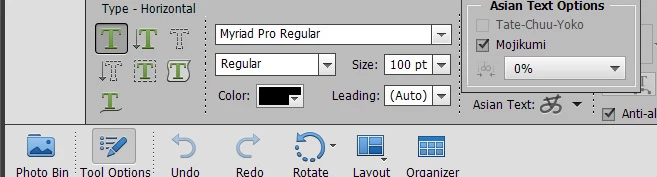
Edit:

Did you 'reset' the text tool to default in both computers? (the icon for the menu of text tools options in on the top right of the tool panel).

1 reply

MichelBParis
MichelBParisCorrect answer
Legend
November 22, 2016

tarak9633391 wrote:

I have photoshop elements 13 and have installed it on 2 computers at home. My daughters computer, the fonts work fine. My computer, the fonts don't kern, spacing between each letter, correctly. We have the same computer and I have looked at everything to see if it is the same and they are. I have even uninstalled and reinstalled the program. Can anyone help me know where to look to change my settings so that the fonts kern correctly?

The option of kerning is not available in Elements, only in the full Photoshop or in Elements with external add-ons (Elements+ for instance). So there should be no difference between computers.

A possible explanation would be that in one or both computer, the menu Edit >> preference >> type has 'show asian text option' enabled.

That option will allow to 'compress' the space between letters.

Edit:

Did you 'reset' the text tool to default in both computers? (the icon for the menu of text tools options in on the top right of the tool panel).

Participant
November 22, 2016

When I show asian text option enabled, nothing changes.  Can you explain more of how to "reset" the text tool to default? I am not seeing where I need to change that. Thanks.