Participant
November 19, 2018
Answered

font size in menu

  • November 19, 2018
  • 1 reply
  • 950 views

I am trialling PSE 2019 to compare it to GIMP.

The font size on my thinkpad is too small to read on PSE.

I cannot find anywhere within PSE to change the font size. I am happy with the size of font in other programmes and do not want to change the global text size in windows.

On searching I find this is a common problem. I find it hard to believe that there is no option in 2019 PSE to make it easier to read.

Can anyone help me with this please? Otherwise GIMP for all its faults may be the answer.

Thank you

    This topic has been closed for replies.
    Correct answer 99jon

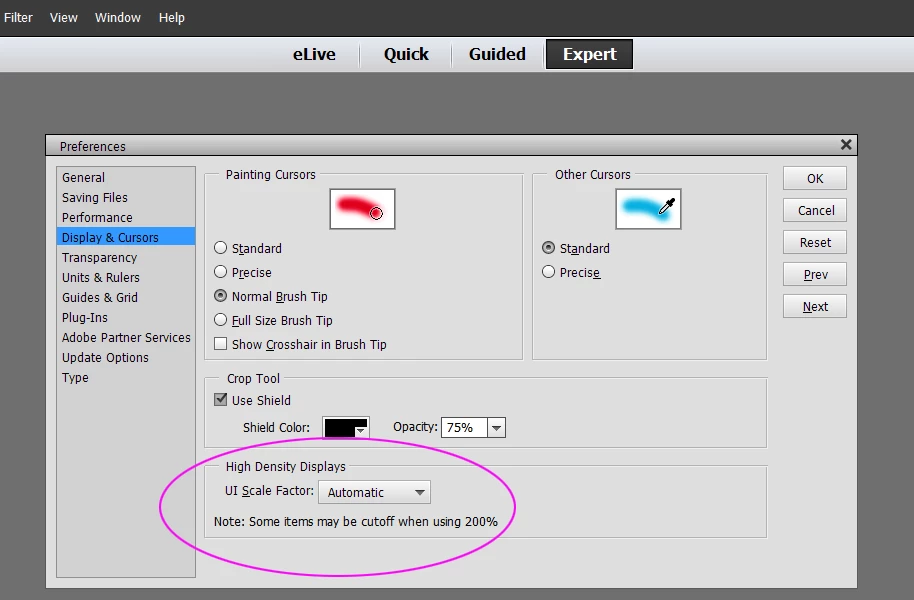
    Options for HiDpi displays are available in the Editor on Windows. There are three possible settings

    Automatic

    Small 100%

    Large 200%

    On Windows go to Edit >> Preferences to change. See my image. After changing settings you must click OK, close the editor and re-launch the software again for the settings to take effect.

    1 reply

    99jon
    99jonCorrect answer
    Genius
    November 19, 2018

    Options for HiDpi displays are available in the Editor on Windows. There are three possible settings

    Automatic

    Small 100%

    Large 200%

    On Windows go to Edit >> Preferences to change. See my image. After changing settings you must click OK, close the editor and re-launch the software again for the settings to take effect.

    Participant
    November 19, 2018

    Many thanks. A speedy answer++ and a helpful one.

    It certainly makes things large, very very large in fact. It seems I will have to choose between the extremely large print version or the teeny tiny one.  Shame there is not more choice. Oh well.