Known Participant
January 2, 2022
Answered

Foreground stays gray no matter what I do

  • January 2, 2022
  • 3 replies
  • 398 views

I have been using PSE for decades and now I am having problems changing foreground to my chosen color, no matter which tool I am at or which color selection method I use.  It stubbornly stays gray.  The bakground stays white.

This topic has been closed for replies.
Correct answer Greg_S.

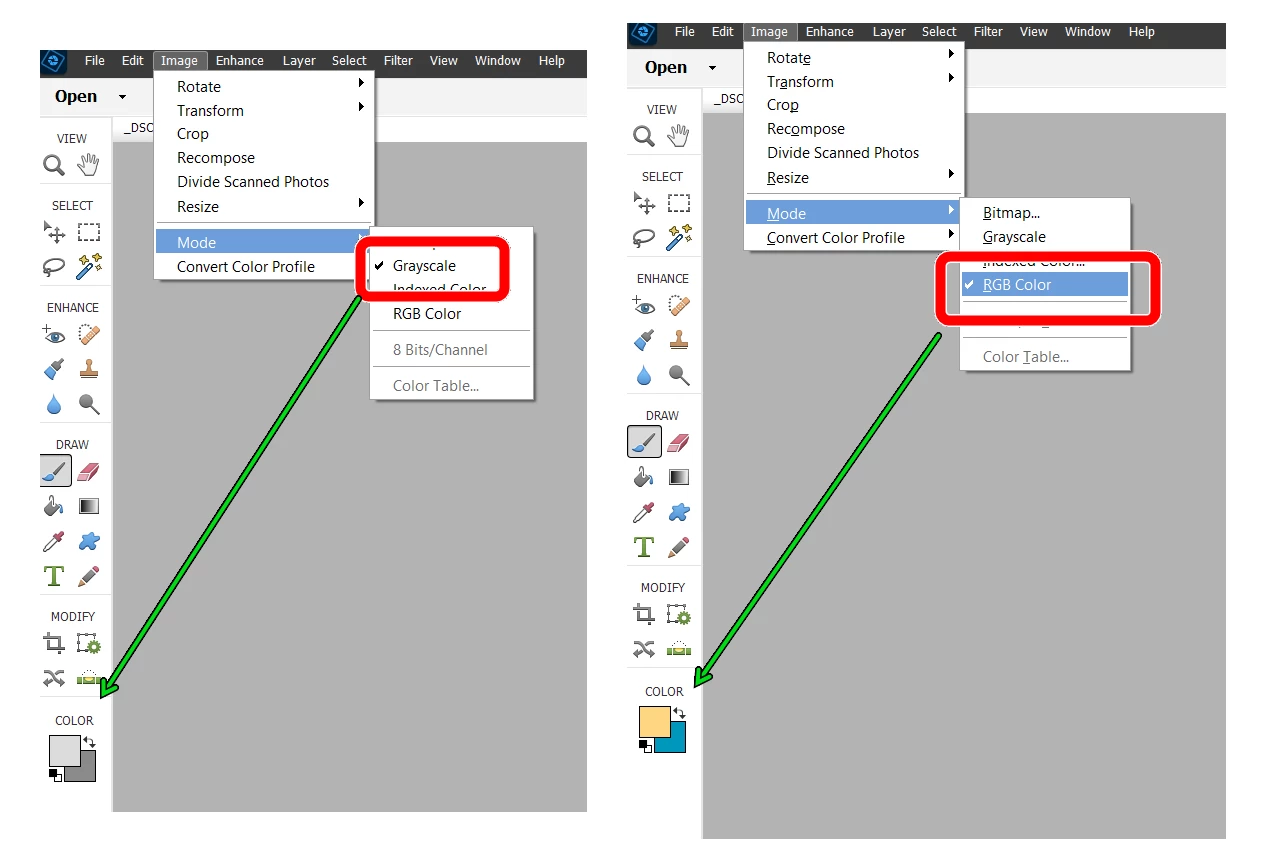
Yes, you are definitely in grayscale mode.  In Elements, go to Image>Mode and change the Mode to RGB Color.


In the following screenshot, you will see what happens when the change is made.  Nothing was done to change the Color picker.


3 replies

Greg_S.
Community Expert
Greg_S.Community ExpertCorrect answer
Community Expert
January 2, 2022

Yes, you are definitely in grayscale mode.  In Elements, go to Image>Mode and change the Mode to RGB Color.


In the following screenshot, you will see what happens when the change is made.  Nothing was done to change the Color picker.


jane-e
Community Expert
Community Expert
January 2, 2022

@kahill1919 


I've moved your post from the Photoshop forum to Photoshop Elements for you so you won't need to repost.


Jane

Derek Cross
Community Expert
Community Expert
January 2, 2022

You may be in Greyscale Color Mode, if so change to RGB Color Mode.

By the way, this is the Photoshop forum, it's best to post in the Photoshop Elements forum is that is what PSE represents:

https://community.adobe.com/t5/photoshop-elements/ct-p/ct-photoshop-elements?page=1&sort=latest_replies&filter=all&tabid=discussions