Participant
April 1, 2025
Answered

Fotos von Photoshop Elements 6 zu Photoshop Elements 2024

  • April 1, 2025
  • 3 replies
  • 200 views

Hallo!

Ich habe auf meinem alten PC Photoshop Elements 6 installiert. Leider habe ich keinen Zugriff mehr auf die Fotos dort. Bekomme ich die Fotos irgendwie zu Photoshop Elements 2024, wenn ich ich das Programm auf dem neuen PC installiert habe?

Correct answer Greg_S.

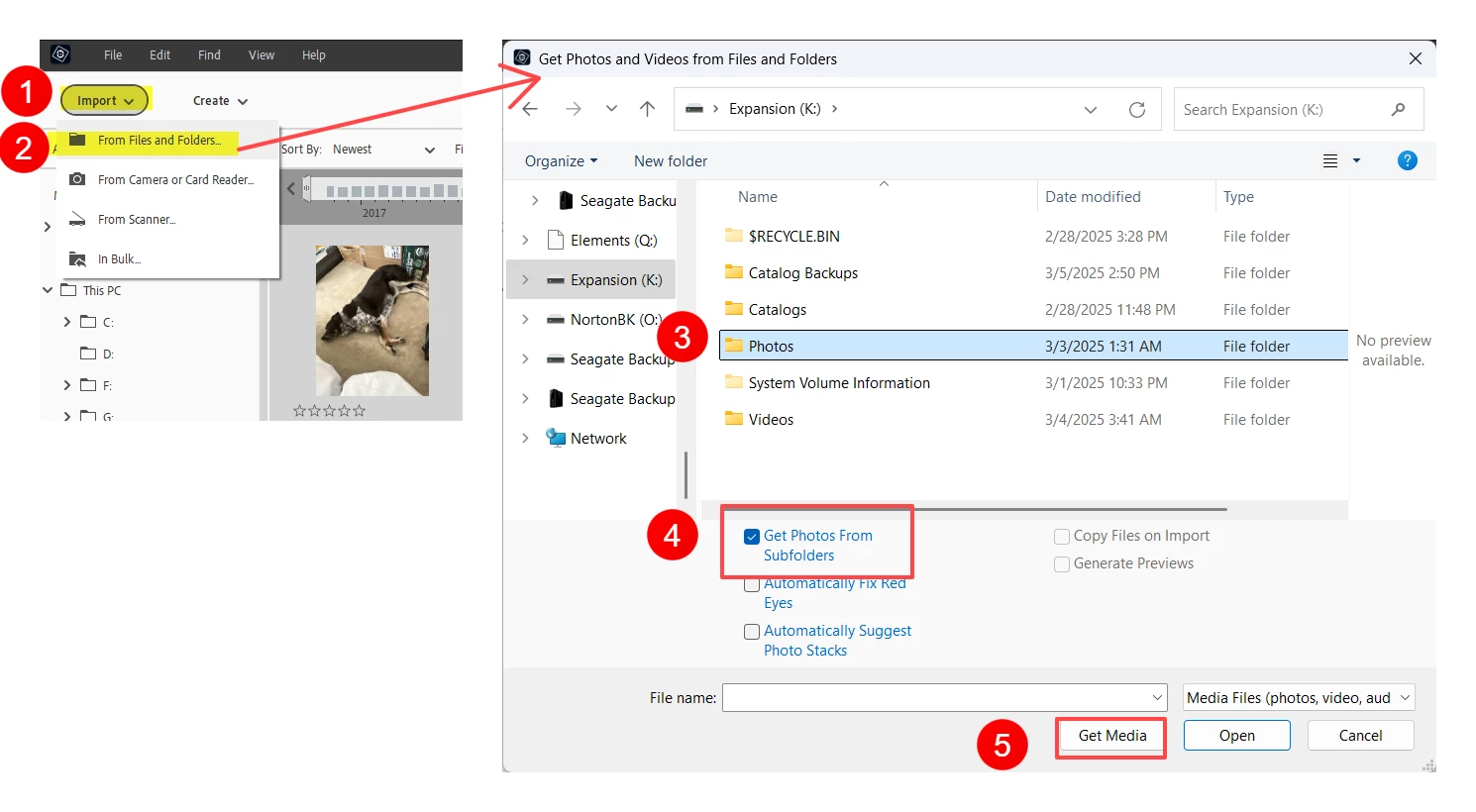
Yes, you can use the Import>From Files and Folders command to bring all of the photos on your external drive into the Elements 2024 catalog.


  • In the dialog that opens, select the external drive or the main folder that contains your photos
  • Make sure that you check the box to include sub-folders
  • Click the Get Media button


Depending on the number of photos you have, the process can take a while.  Once the photos have been imported, it also takes a long time for the thumbnails to be generated.   The program will then perform face recognition on your photos so that you can name the people in your photos.  The photos will also be analyzed for their content.  Smart tags will be applied to each photo that will allow you to search for particular subjects.


However, because you did not make a backup of your catalog, you will probably lose all of the organization previously conducted in Elements 6, such as keyword tags and Albums.  I'm not sure about this, and you may be given the opportunity, after the import, to include any saved keyword tags.  If you choose this option, the previously saved keyword tags will appear under the Imported Keyword Tags category.  The reason I am not sure what will happen is because your keyword tags will be from such an old version of the program.   There have been many changes to the program in the meantime and a different database system is now in use.

 

3 replies

Greg_S.
Community Expert
Greg_S.Community ExpertCorrect answer
Community Expert
April 2, 2025

Yes, you can use the Import>From Files and Folders command to bring all of the photos on your external drive into the Elements 2024 catalog.


  • In the dialog that opens, select the external drive or the main folder that contains your photos
  • Make sure that you check the box to include sub-folders
  • Click the Get Media button


Depending on the number of photos you have, the process can take a while.  Once the photos have been imported, it also takes a long time for the thumbnails to be generated.   The program will then perform face recognition on your photos so that you can name the people in your photos.  The photos will also be analyzed for their content.  Smart tags will be applied to each photo that will allow you to search for particular subjects.


However, because you did not make a backup of your catalog, you will probably lose all of the organization previously conducted in Elements 6, such as keyword tags and Albums.  I'm not sure about this, and you may be given the opportunity, after the import, to include any saved keyword tags.  If you choose this option, the previously saved keyword tags will appear under the Imported Keyword Tags category.  The reason I am not sure what will happen is because your keyword tags will be from such an old version of the program.   There have been many changes to the program in the meantime and a different database system is now in use.


Greg_S.
Community Expert
Community Expert
April 1, 2025

As I understand your question, the answer is no.  Elements does not copy the photo/video files in the catalog.  It merely points to the files stored on your computer.  If you cannot access the photos on your old computer (e.g. because the hard drive has crashed), you will not be able to retrieve the photos by using Elements 2024. 


If you backed up your catalog in Elements 6, you will be able to retrieve the photos by restoring the backup using Elements 2024.  However, because the backup is so old, there may be some additional steps you need to take.  Let us know if you have a backup and I will find the instructions for you.

Participant
April 2, 2025

I have the photos on an external hard disk.
Unfortunately, I have not made a backup of the catalog.
I hope I can somehow get the photos from the external hard disk into Elements 2024.

jane-e
Community Expert
Community Expert
April 1, 2025

@stefan_0818 


I've moved your post from Photoshop to the Photoshop Elements forum.


Jane