This topic has been closed for replies.

6 replies

Jeff Arola
Community Expert
Community Expert
June 11, 2024

Another thing to try is to download the Adobe DNG Converter and see if it will convert your ARW files to DNG copies

which should then open in Photoshop Elements 2023.

https://helpx.adobe.com/camera-raw/using/adobe-dng-converter.html

Participating Frequently
June 12, 2024

Dag Jeff 

Nu kan ik de dng foto's openen in Photo Elelements 2023. Bedankt.

Maar is dit eigenlijk niet hetzelfde dan fotograferen in jpeg of jpg, want ik zie dat het bestand in dng ca. 30 mb is en in raw ca. 65 mb. Kortom heb je bij omzetten in dng niet minder mogelijkheden om te bewerken omdat het programma dit al heeft gedaan?

Groet Gerrit 

Jeff Arola
Community Expert
Community Expert
June 12, 2024

Convert to DNG uses losseless compression, so that's why in most cases the file sizes are

smaller, however, according to Adobe the actual DNG is the same quality as the original raw file.

Jeff Arola
Community Expert
Community Expert
May 27, 2024

According to this your Sony A7 IV (ILCE-7M4) .ARW files should be supported in Camera Raw 14.1 and later.

https://helpx.adobe.com/camera-raw/kb/camera-raw-plug-supported-cameras.html


If possible could you share one of the Sony A7 IV (ILCE-7M4) .ARW files using something like Dropbox so we can try it on our end?

Participating Frequently
May 27, 2024

 Daf Je

Ik weet niet hoe dat met dropbox werkt. Ik kan wel versturen met We transfer, maar dan moet ik jou mailadres hebben 

Participating Frequently
June 3, 2024

Dag Jeff

Kan ik noet wat RAW foto's sturen via we transfer. Dan lukt het me wel 


Groet Gerrit 

Jeff Arola
Community Expert
Community Expert
May 24, 2024

If in the Photoshop Elements 2023 editor you go to Help>About Plug-In is Camera Raw listed and if so if you click on the words Camera Raw, what version is it?

Participating Frequently
May 27, 2024

2022

Versie: 14.4.0.1121

Jeff Arola
Community Expert
Community Expert
May 18, 2024
Participating Frequently
May 18, 2024

Dag Jef,

Met deze link kan ik 16.2 installeren. Had ik en heb ik opnieuw gedaan.

Bij deze stap: 
Op Windows: C:\Program Files\Common Files\Adobe\Plug-ins\Elements<Version Number>\Bestandsindelingen

krijg ik eeb foutmelding:

Het bestand is niet gevonden

Het is mogelijk verplaatst, bewerkt of verwijderd.


Dus ik kom nog niet verder. 
Groet Gerrit 


Participating Frequently
May 18, 2024

Dag Jef,

Met deze link kan ik 16 2 installeren. Geen 15 5. Had ik en heb ik opnieuw gedaan.

Bij deze stap: 

C Program Files Common Files Adobe Plug ins Elements Version Number Bestandsindelingen


krijg ik een foutmelding:

Het bestand is niet gevonden

Het is mogelijk verplaatst, bewerkt of verwijderd.


Dus ik kom nog niet verder. 
Groet Gerrit 


Jeff Arola
Community Expert
Community Expert
May 18, 2024

From within the Photoshop elements 2023 Editor did you try Help>Install Camera Raw?

Participating Frequently
May 18, 2024

Dag Jef 

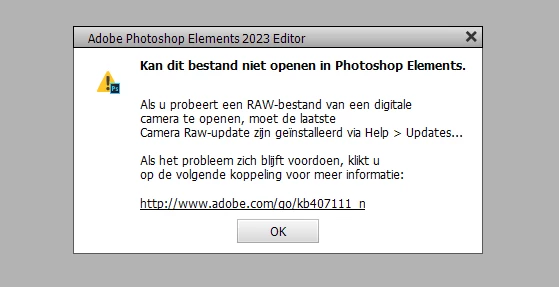
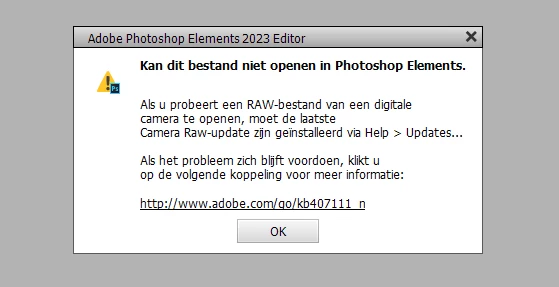
Ik heb het ( install camera raw) zojuist opnieuw geïnstalleerd , maar de foutmelding blijft. 

Participating Frequently
May 18, 2024

Nog ter aanvulling: Ik kan niet op 'updates'  onder help klikken. 

Jeff Arola
Community Expert
Community Expert
May 16, 2024

What operating system are you using?


What make and model camera do you have?

Participating Frequently
May 18, 2024

Camera: 

camera ILCE-7M4 

SYSTEEM

Windows 11 home

intel core  i5

64 bits besturingssysteem

16 GB RAM