
Participant
February 1, 2020
Answered

Frustrating issue with Eraser Tool

  • February 1, 2020
  • 2 replies
  • 1014 views

My issue is with the Eraser Tool. For the tool, there is a cirle-cursor. My Issue is that the eraser tool does not fill the circle-cursor but is inside of the circle-cursor (small than the cursor). So, when I want to erase close to a line, I have to guess by overlapping the circle-cursor. It is very frustrating. It used to work, no longer. It is not a caps lock issue from what I can tell. I am using PS Elements 2019.


Thank you in advance for your help and guidance on this one!
This topic has been closed for replies.
Correct answer Jeff Arola

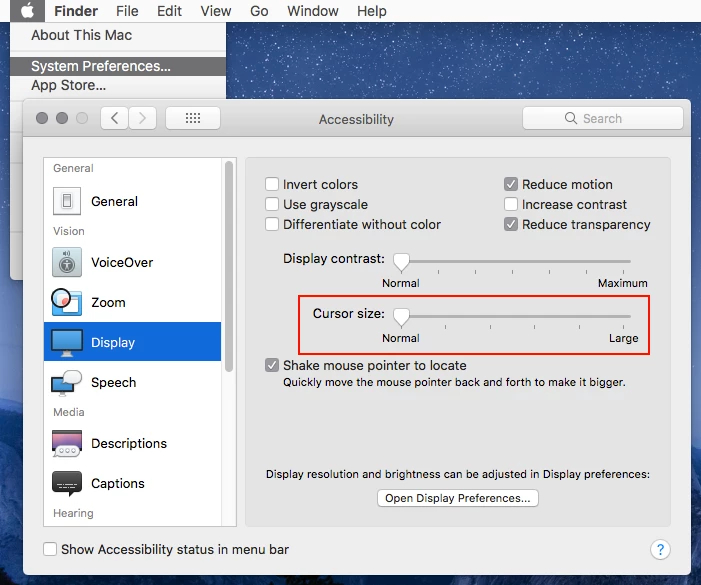
Go to System Preferences>Accessibility>Display and set the Cursor size to Normal.


2 replies

Jeff Arola
Community Expert
Jeff ArolaCommunity ExpertCorrect answer
Community Expert
February 1, 2020

Go to System Preferences>Accessibility>Display and set the Cursor size to Normal.


Participant
February 1, 2020

You. Are. Awesome!  I have been banging my head on this for weeks. I have no idea it was set from Normal, but you solved my issue. 

Jeff Arola
Community Expert
Community Expert
February 1, 2020

What operating system are you using?

Participant
February 1, 2020

Mac, Catalina 10.15.2