
Thomas_Ra
Participant
August 9, 2018
Answered

gespeicherte Suche aufrufen - geht nicht

  • August 9, 2018
  • 1 reply
  • 284 views

Ich habe Photoshop Elements 13 und habe eine Suche gespeichert. Will sie erneut aufrufen, so geht das nicht, da sie mir nicht angezeigt wird. Früher ging das einmal in Elements 6 (oder auch in 13?) Ich hatte aber vor geraumer Zeit meinen PC neu aufgesetzt und jetzt bräuchte ich das mit der gespeicherten Suche. Sie ist aber definitiv gespeichert. Denn wenn ich es erneut tun möchte, sagt er mir, dass schon eine Suche mit dem Namen gespeichert ist.

NTEvNTM1

Im Menü fehlt dieser Punkt komplett.

Weiß jemand Hilfe?
This topic has been closed for replies.
Correct answer MichelBParis

If I understand well, you can't find the list of your 'saved searches' in Elements 13 Organizer.

I no longer have version 13, but I remember the 'saved searches' worked differently than in other versions.

So, I am using the pdf help file for version 13:

https://help.adobe.com/archive/en/elements-organizer/13/elements-organizer_reference.pdf

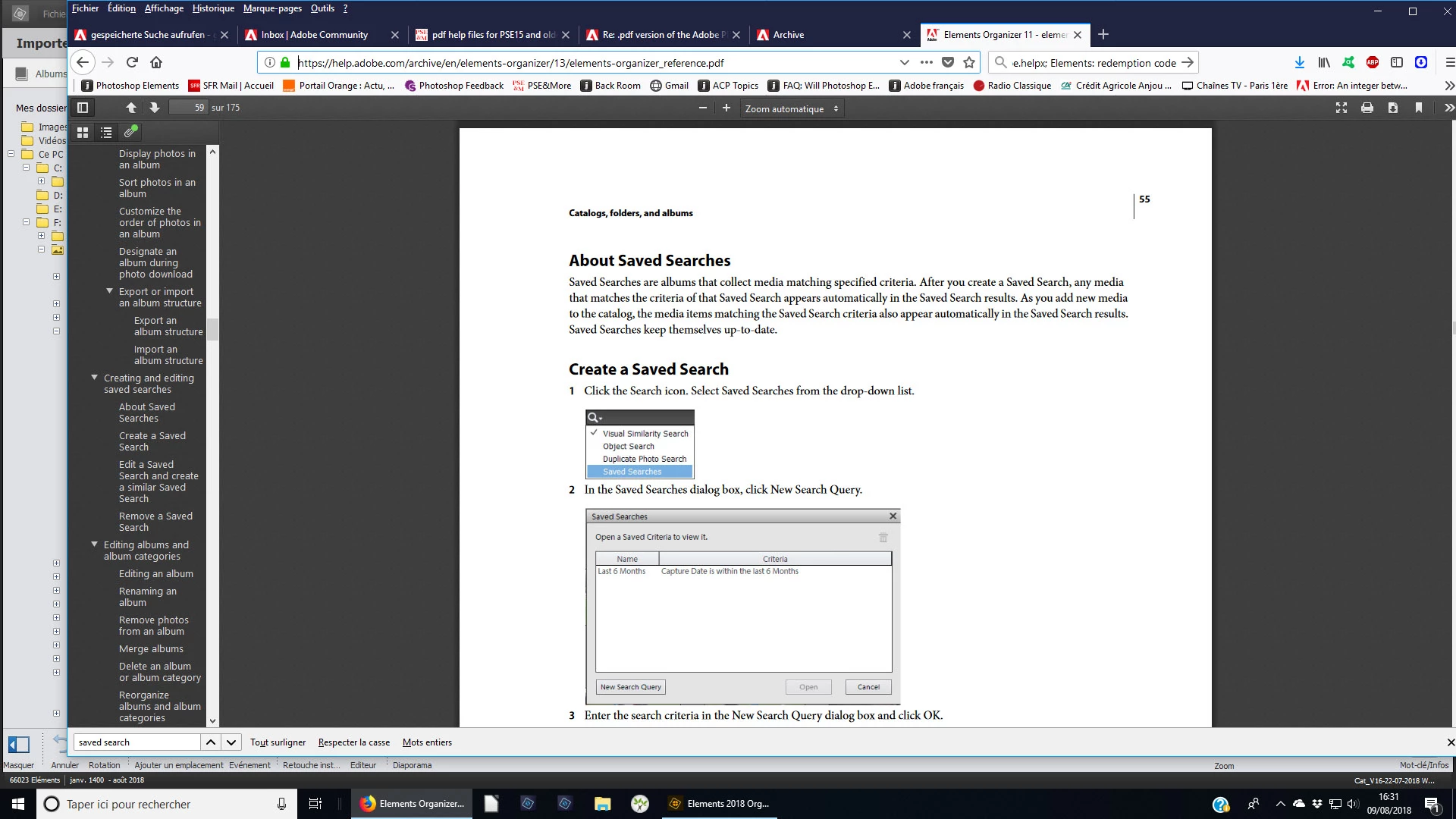
See page 55.

To recall a saved search, you have to click on the search button on the top right part of the display (a magnifying glass).

You get a new dialog with the list of your saved searches.

1 reply

MichelBParis
MichelBParisCorrect answer
Legend
August 9, 2018

If I understand well, you can't find the list of your 'saved searches' in Elements 13 Organizer.

I no longer have version 13, but I remember the 'saved searches' worked differently than in other versions.

So, I am using the pdf help file for version 13:

https://help.adobe.com/archive/en/elements-organizer/13/elements-organizer_reference.pdf

See page 55.

To recall a saved search, you have to click on the search button on the top right part of the display (a magnifying glass).

You get a new dialog with the list of your saved searches.

Thomas_Ra
Thomas_RaAuthor
Participant
August 9, 2018

@MichelBParis Danke, Du hast mir sehr geholfen.