Participating Frequently
February 4, 2019
Question

Getting a response/answer

  • February 4, 2019
  • 3 replies
  • 1436 views

I have asked the below question twice in the PSE forum and have never received any type of help/response.  Where can I go to get an answer for my question??  I first asked this question in April of 2018...so I think I have been pretty patient waiting for some type of assistance.

I don't know where else to ask for help or find the answer.

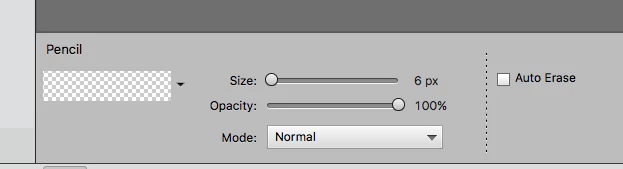
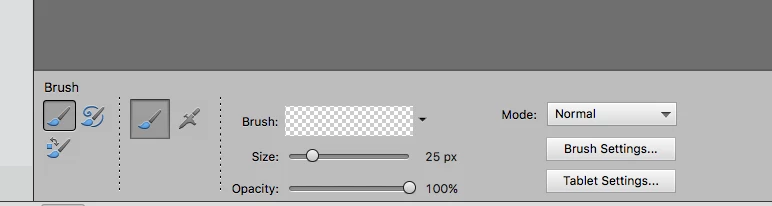
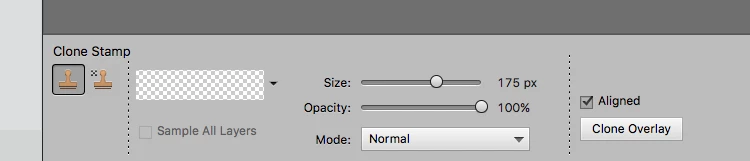
Preview Panes in PSE are transparent

I asked this question last April and received NO responses. I am STILL having this issue even after installing PSE 2018.  I thought it was just an issue with 2014, but I still have this issue.  What is the deal?

Does anyone know why or how to get my preview panes to work again??  A couple months ago they all became transparent.  Although I can still choose what I want and it works correctly, I can't see the current brush/pencil/stamp etc.. that I am using.  It has become annoying.

(using a on a MAC)
[Here is the list of all Adobe forums... https://forums.adobe.com/welcome]

[Comments is to ask about the operation of the Forum, not a specific program]

[Moved from the Comments forum to the specific Program forum... Mod]

    This topic has been closed for replies.

    3 replies

    Greg_S.
    Community Expert
    Community Expert
    February 7, 2019

    I know nothing about Macs so can't really help you.  Sounds to me like a graphics card/driver issue.  Have you updated the driver on the graphics card (if that's possible with Macs)?

    Participating Frequently
    February 7, 2019

    Unfortunately the graphics drivers are built into the OS, so I am stuck.  thanks again for trying to help me out!

    John Waller
    Community Expert
    Community Expert
    February 7, 2019

    Haven't seen it mentioned so just in case you haven't covered it, have you tried unchecking Use Graphics Processor in PSE Preferences > Performance?

    Greg_S.
    Community Expert
    Community Expert
    February 4, 2019

    What OS are you using?  What are your computer and graphics card specs?  How much RAM do you have?

    You can try deleting the preferences file.  Press Alt+Ctrl+Shift immediately after launching the program and accept the dialog to delete the Adobe Settings file.

    Participating Frequently
    February 5, 2019

    Currently using Mojave version 10.14.3 (but had this issue last year when I was using High Sierra).  Computer/graphic card specs - NVIDIA GeForce GT 755M 1024 MB graphics.  Finally I have 24 gb of RAM.

    Tried resetting the preference file, and it did not "fix" my issue.

    Greg_S.
    Community Expert
    Community Expert
    February 5, 2019

    I'm grabbing at straws here, but have you tried changing how the brush is displayed:

    John T Smith
    Community Expert
    Community Expert
    February 4, 2019

    Be sure to remain signed in with your Adobe ID before accessing the link below

    -you must also allow 'cookies' in your web browser for this to work

    https://helpx.adobe.com/contact/support.html