
Participant
September 22, 2022
Question

Getting error code 199 while installing Photoshop Elements

  • September 22, 2022
  • 1 reply
  • 492 views

hola e querido en poerme con contacto con algien que pueda ayudarme me a encantado photoshop elements que incluso han habido muchisimas personitas que e recomendado y ayudado a varias a que lo instalen y lo compren pero hace tres dias no abria entonces lo desinstale y volvia instalarlo pero ahora dice error codigo 199 no se que pudo haver pasado y la verdad necesito usarlo alguien puede ayudarme por favor DIOS LES BENDIGA  espero puedan guiarme que esta pasando o que de malo estoy haciendo gracias.
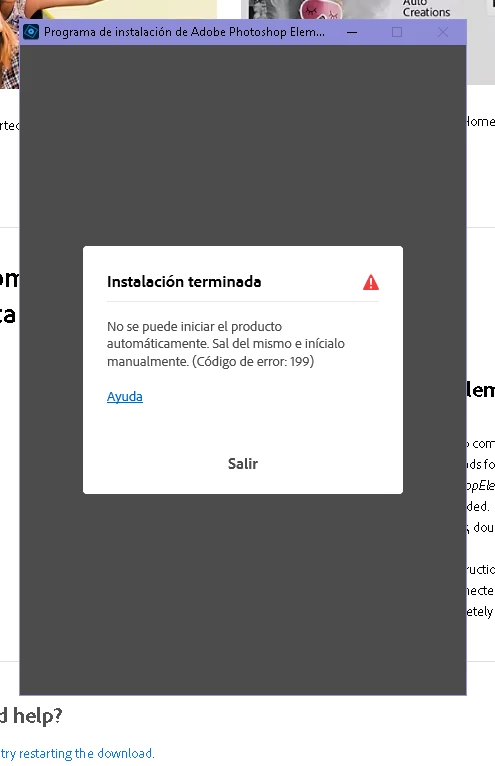


{Title edited by Moderator}

This topic has been closed for replies.

1 reply

Ranjisha Sengupta
Legend
September 23, 2022

Hi there,


Thanks for reaching out.

Which version of the application are you trying to install?

Can you please confirm if a desktop shortcut has been created for the application on your computer? If yes, what happens when you try to launch the program using that shortcut? Also, it would be helpful to know at what percentage of installation you get this error.


Please try out the suggestion in a similar discussion on our forum: https://community.adobe.com/t5/download-install-discussions/elements-2022-error-199-on-the-installation/m-p/12441202.


Let us know if it helps.


Thanks,

Ranjisha

Participant
September 25, 2022
Hello, I bought the Elements 2022 license and when it is being installed it
reaches 5% slowly and goes at a 100% second and then says Error #199[image:
photoshop no descargas.PNG]
Peru Bob
Community Expert
Community Expert
September 25, 2022

Please go to Adobe Customer Service (Make sure to sign in to your Adobe account first and allow popups on your browser. You may not be able to see the chat window if using a VPN.):
https://helpx.adobe.com/contact.html?rghtup=autoOpen will automatically open the chat window.
Type "Agent" in the chat box to bypass the chatbot and be connected to a person.

You may also be able to contact Adobe by phone:
https://helpx.adobe.com/contact/phone.html