This topic is closed to new replies. Start a new post to keep the conversation going.
Greg_S.
Greg_S.Correct answer
Community Expert
Feb 19, 2024 8:04 PM UTC

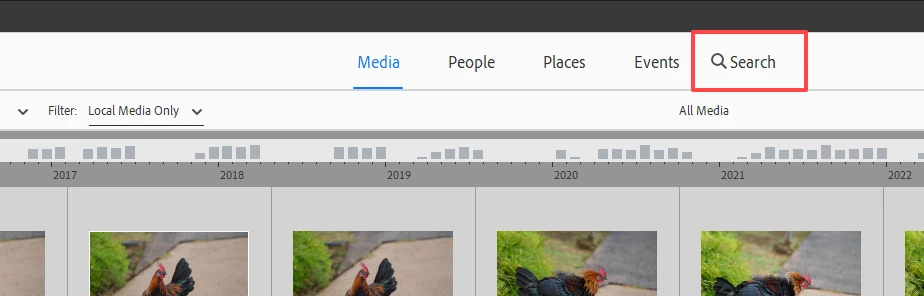
What criteria do you want to search by?  The Search button has been moved to what I thought was a more visible position in the Elements 2024 Organizer:

7 replies

Greg_S.
Community Expert
Greg_S.Community ExpertCorrect answer
Community Expert
Feb 19, 2024 8:04 PM UTC

What criteria do you want to search by?  The Search button has been moved to what I thought was a more visible position in the Elements 2024 Organizer:

Translate
thisisirrational
Inspiring
Feb 19, 2024 11:21 PM UTC

I am never going to get over being angry at Photoshop Elements 2024! What you are showing me - I just saw now - NOT YESTERDAY when I did not see it and wrote my piece here about "where is it"! It is showing today but did not show yesterday. Also, I am STILL having a major problem with elements 2024 freezing up!!! It did it three times today within one hour! I think Adobe needs to return my money or give me an updated and corrected version of the software, this one has too many problems.

Translate
Walter_H
Legend
Feb 19, 2024 9:36 AM UTC

@thisisirrational, In the Organizer, click Find on the Menu bar.

Translate
--Walter in Davie, FL
thisisirrational
Inspiring
Feb 19, 2024 3:28 PM UTC

I do not know the filename. I have seen the word "search" at the top of the screen in the past but now it is not showing.

Translate
hatstead
Inspiring
Feb 19, 2024 5:28 PM UTC

Please post a screen shot so that we may visualize what appears on your screen.

Translate
hatstead
Inspiring
Feb 19, 2024 12:49 AM UTC

In the Editor, click on the Advanced tab, then go to File menu>open.  Point to where your picture file is on your computer.

Translate
thisisirrational
Inspiring
Feb 19, 2024 3:31 PM UTC

thank you but that does no good if the file is a year old, it will not show.

Translate