
Participant
January 4, 2023
Answered

Healing Brush Selection is Not Visible

  • January 4, 2023
  • 4 replies
  • 505 views

My healing brush displays the circle, but not the area selected once I click it. No way to position/align the selection on the area to be mended. Same with brush - no visible selection, just the circle. Caps lock is off, brush/cursor set to normal brush. This may be another result of an accidental click/command but I have not been able to find it. 
This topic has been closed for replies.
Correct answer Greg_S.

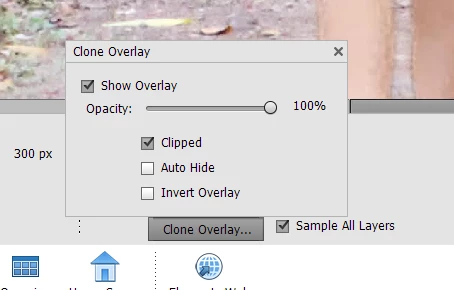
I forgot to tell you to look at the Clone Overlay settings.  Are they any different than mine shown here:

4 replies

Participant
October 26, 2024

Clone overlay kha milega 

Greg_S.
Community Expert
Greg_S.Community ExpertCorrect answer
Community Expert
January 4, 2023

I forgot to tell you to look at the Clone Overlay settings.  Are they any different than mine shown here:

Participant
January 4, 2023

I had tried all of those selections...............but somehow I missed it. It works!! Thanks so much, it's been driving me crazy.

Greg_S.
Community Expert
Community Expert
January 4, 2023

Try resetting the preferences file. Go to Edit>Preferences>General tab and click the Reset Preferences on next launch button.

Greg_S.
Community Expert
Community Expert
January 4, 2023

Try using the Reset Tool option in the dropdown menu at the right of the Tool Bin:

Participant
January 4, 2023

I have done that, and tried again just now. No improvement.