Participant
October 20, 2018
Question

HELP

  • October 20, 2018
  • 2 replies
  • 222 views

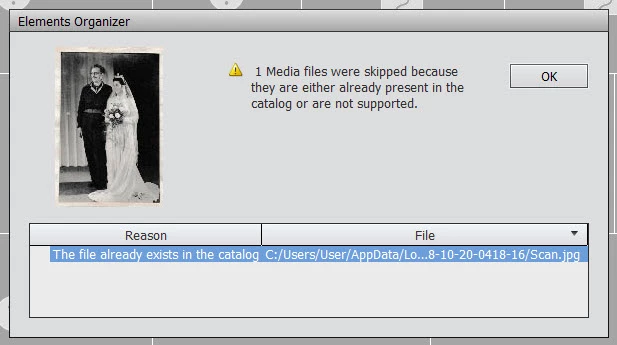
Whatever I try to scan this message comes up ... have cleared the cache but didn't help ...

that catalog doesn't seem to exist ???

This topic has been closed for replies.

2 replies

MichelBParis
Legend
October 29, 2018

First test to see if it's a "non supported" format (not likely with jpegs, but...)

- Create a new empty catalog and try to import such a scanned file in that catalog. If it imports well, then it's the first reason.

Also, I am not sure but I suspect that you can't import files with more than 30 000 pixels in any dimension. That would depend on the size of your scan and its ppi resolution.

Then, do a search from your Explorer or finder for files named "Scan.jpg". The organizer should not filter duplicates based only on the file name. The organizer filters by date_taken (for scan, that's something like another date type since date_taken is meaningless for scans) AND by file size in KB. The size should not be same for different scans in jpeg format.

Do you find such "scan.jpg" files on your drive? Would assigning other file name or location on your drive enable you to catalog your scans?

Bani Verma
Legend
October 29, 2018

Moving this query to Photoshop Elements​ community.