
Participant
November 17, 2023
Answered

Help finding app to install Photoshop & Premiere Elements 2021

  • November 17, 2023
  • 2 replies
  • 249 views

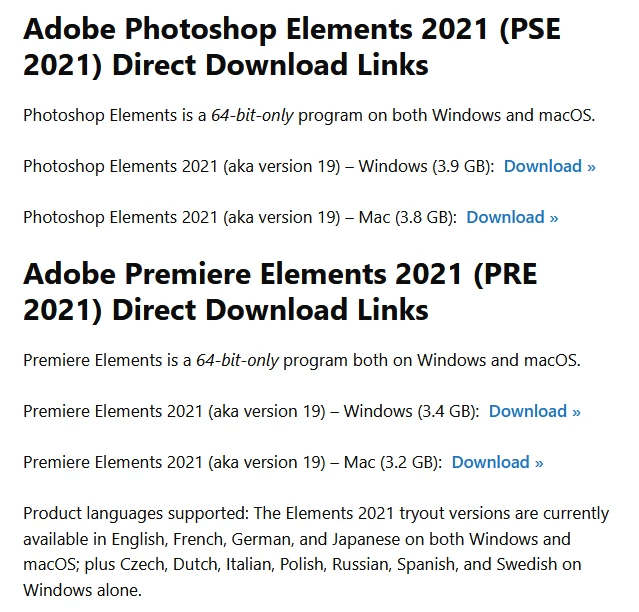
I have a new laptop and keep going in circles trying to install my stand-alone 2021 version of Photoshop Elements. I read through seveal of these threads but they have instructions like "go to the CC page and chose 'More' next to the app you want. But there is no 'More' next to Photoshop. I have the redemption code and serial number but I initially bought it on Amazon (education version) and that link only says that it has already been downloaded. I am at a loss. Appreciate any help you can offer. Thank you.
This topic has been closed for replies.

2 replies

jane-e
Community Expert
Community Expert
November 18, 2023


@Nancy J.33591576skxj wrote: they have instructions like "go to the CC page and chose 'More' next to the app you want"


Photoshop and Premiere Pro are subscription only and managed in the Creative Cloud App. The instructions you are reading apply to them.


Photoshop Elements and Premiere Elements are different applications with perpetual licenses and are not managed in the CC app. Once installed, some folks use them for several years; others upgrade annually. 


Follow the instructions from Ged, and I'll move your post from Photoshop to Photoshop Elements for you.


Jane


Participant
November 18, 2023

Thanks, yes, I know about the stand alone vs the subscription. I thought Creative Cloud came with it? Have been using Photoshop since PS2 and it's exploded into so many products now. I appreciate you taking the time to answer this question.

Ged_Traynor
Community Expert
Ged_TraynorCommunity ExpertCorrect answer
Community Expert
November 18, 2023
Participant
November 18, 2023

Thank you so much. I had visited that page before but kept clicking the Download button associated with Adobe Images and could not figure it out. Appreciate your help and all those who upvoted!