Participant
November 6, 2024
Answered

Help with an element

  • November 6, 2024
  • 1 reply
  • 281 views

I cut out the border on the snowman and then did something to it to put a red ring around the box.  I can't remember how I did this.  I need to do it on a couple more images.  I'm using Element 2021.  Can someone tell me how to do this?


Norma

This topic has been closed for replies.
Correct answer Greg_S.
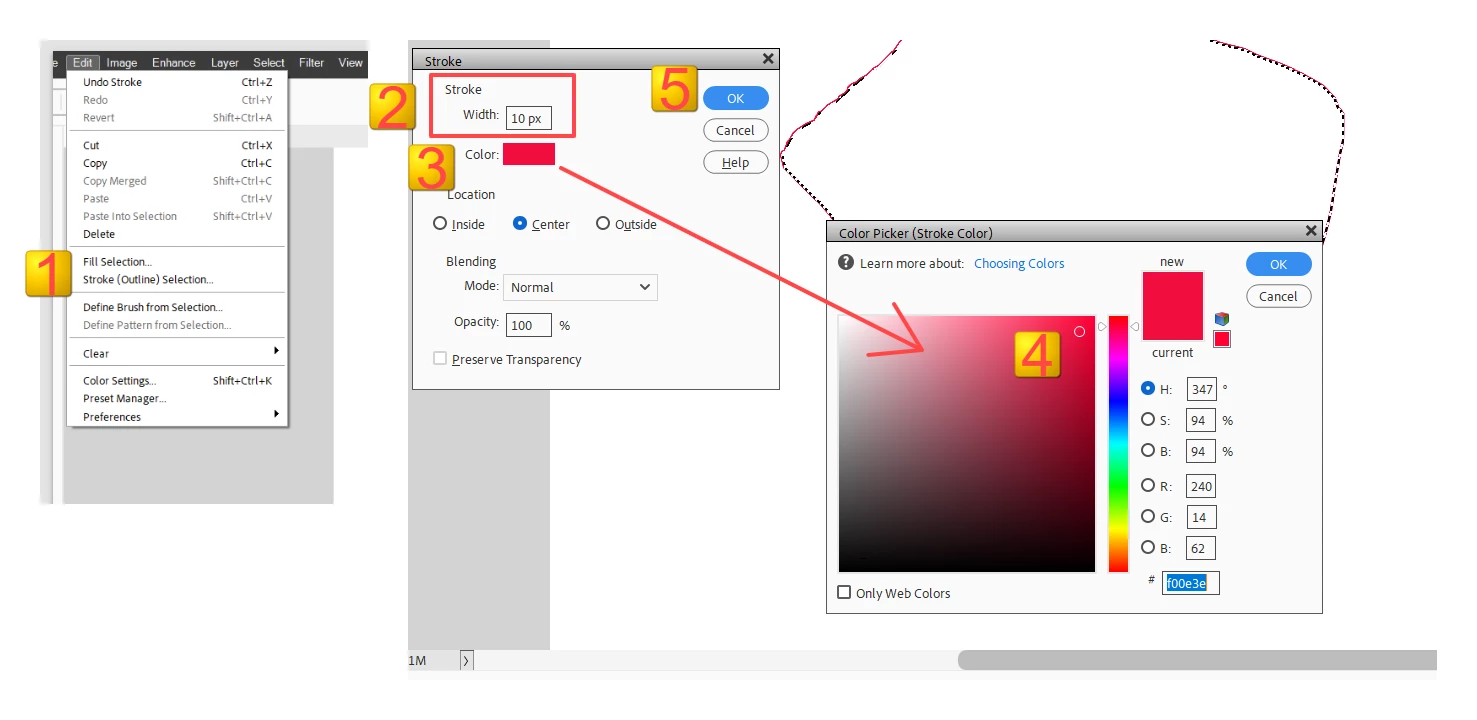
  • Create a selection of the area with the border
  • Select Edit>Stroke Outline Selection . . .   (a dialog box will open)
  • Type in an appropriate pixel size for the border
  • Change the color to your desired hue.
  • Click OK

1 reply

Greg_S.
Community Expert
Greg_S.Community ExpertCorrect answer
Community Expert
November 6, 2024
  • Create a selection of the area with the border
  • Select Edit>Stroke Outline Selection . . .   (a dialog box will open)
  • Type in an appropriate pixel size for the border
  • Change the color to your desired hue.
  • Click OK

nckarterAuthor
Participant
November 6, 2024
Thanks for your recommendation. It worked.