Participating Frequently
December 1, 2022
Answered

Help with missing Effects in Visibility Panel

  • December 1, 2022
  • 6 replies
  • 5697 views

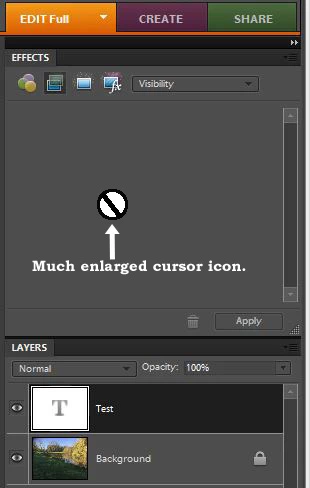
I am using PSE 8.0 and because of my age I don't really want to upgrade to a newer version because I am fairly conversant with 8.0 and it does all I need. BUT. I recently found an amazing video that showed how to make transparent text. The final action is to go to the Effects Panel and click Visibity from the drop down box and choose one of the three options. It worked for a while but now the options are no longer visible. I suppose I may have clicked the delete option instead of the Apply option by mistake. I have acquired the file Visibility.asl and pasted it into the correct folder to replace the original file but that didn't work. I have attached an image of what I get when I choose the Visibility option now. Just a blank cursor and no options. Can anyone help me please ? Thanks to anyone who can.

This topic has been closed for replies.
Correct answer Jeff Arola

I have found the area where the ability to see hidden files, folders, & drives option can be changed but mine was ticked to show them anyway. But I still can't find Thumbdatabase.db3 or Mediadatabase.db3 


You want to look in

C:\ProgramData\Adobe\Photoshop Elements\8.0


Yes you can just put the files into another folder like on your desktop rather than deleting them right away.


6 replies

Jeff Arola
Community Expert
Community Expert
December 1, 2022

If you have problems with my instructions, then could you specify what version of windows your using?

Participating Frequently
December 1, 2022

Thank you. I have had a brief look for your instructions to find the hidden Programdata folder without any luck and so maybe it's because my system is a 64bit Windows 8.1 and it looks like you are using Win 10 and things are slightly different. However I think I have seen your screen somewhere and so I will have a look for it so that I can "unhide" the hidden folders.

Jeff Arola
Community Expert
Community Expert
December 1, 2022

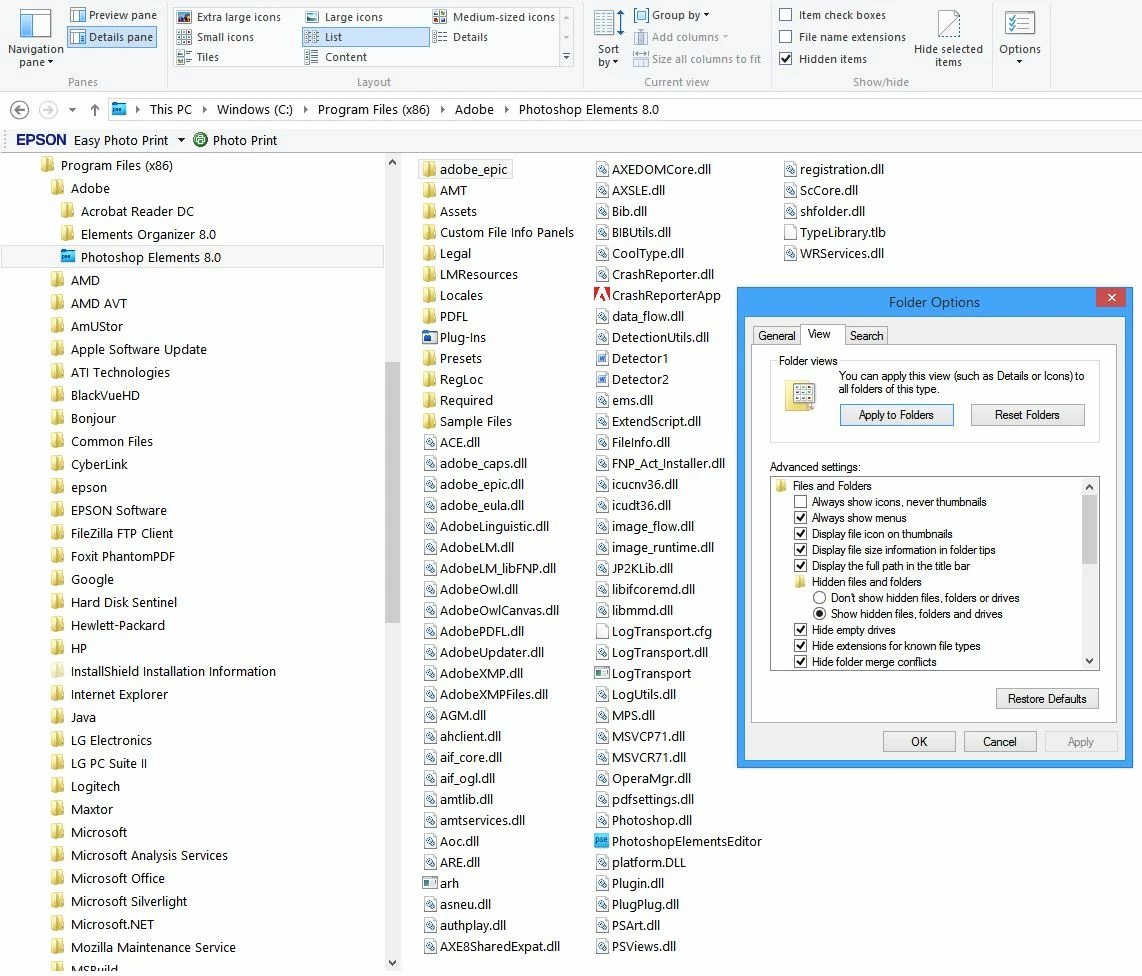
Windows 8.1 has a few less menus, however in File Explorer clicking on View then Options should get the Folder Options as above.


Jeff Arola
Community Expert
Community Expert
December 1, 2022

The Visibility Effect (Layer Style) that is used for the Effects tab is in the ProgramData folder

C:\ProgramData\Adobe\Photoshop Elements\8.0\Photo Creations\layer styles


The Layer Styles folder in

C:\Program Files (x86)\Adobe\Photoshop Elements 8.0\Presets\Styles

has Layer Styles that show up, for example, when you click on the Tool Options for Shapes and Type under Style.


Participating Frequently
December 1, 2022

Thank you. When I click on Styles with some text on an image as you have done all I get are the patterns as shown below. I have used these before but I do not get the drop down menu like I do when I have the Effects Panel showing on the RH side of the screen as shown in one of my previous posts.

Jeff Arola
Community Expert
Community Expert
December 1, 2022

Click on the small double arrows as highlighted in the screenshot below


Jeff Arola
Community Expert
Community Expert
December 1, 2022

I believe if you reset a couple of files, you can get back the Visibility Effects.


Go to

C:\ProgramData\Adobe\Photoshop Elements\8.0

and Delete the

ThumbDatabase.db3


Then go to

C:\ProgramData\Adobe\Photoshop Elements\8.0\Locale\en_us

and Delete the

MediaDatabase.db3


Start the pse 8 editor and wail for awhile for the Effects to build.

You'll most likely see a dialog indicating as such

It could take 5 mins or more.


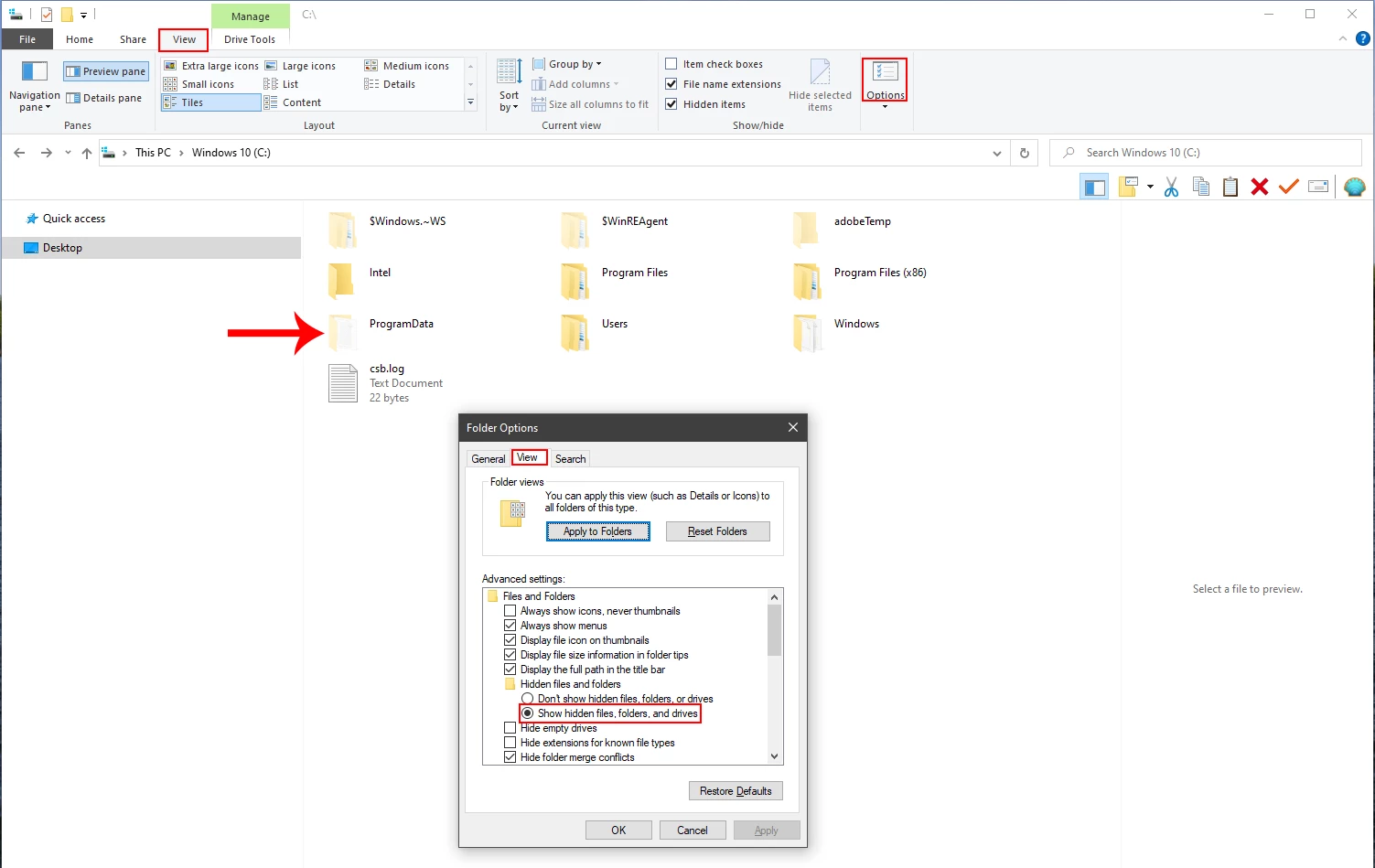
The ProgramData folder is hidden by default on windows systems, so to see it so you can delete the mentioned files

follow these instructions:

Open Windows Explorer/File Explorer, click View,click Options, then under the View tab and enable Show files, folders and drives


Participating Frequently
December 1, 2022

Thank you for all that. It is 10.00pm in the U.K. now so if I can I will have a go at that tomorrow. Since I am in the U.K. would PSE 8.0 be any different to what the US version is ?

Jeff Arola
Community Expert
Community Expert
December 1, 2022

Above where i wrote

Then go to

C:\ProgramData\Adobe\Photoshop Elements\8.0\Locale\en_us

and Delete the

MediaDatabase.db3


The path for the UK version might be

C:\ProgramData\Adobe\Photoshop Elements\8.0\Locale\en_uk


jane-e
Community Expert
Community Expert
December 1, 2022

@King273835946yzq 


I've moved your post from Photoshop to Photoshop Elements.


Jane

Participating Frequently
December 1, 2022

I am using PSE 8.0 and because of my age I don't really want to upgrade to a newer version because I am fairly conversant with 8.0 and it does all I need. BUT. I recently found an amazing video that showed how to make transparent text. The final action is to go to the Effects Panel and click Visibity from the drop down box and choose one of the three options. It worked for a while but now the options are no longer visible. I suppose I may have clicked the delete option instead of the Apply option by mistake. I have acquired the file Visibility.asl and pasted it into the correct folder to replace the original file but that didn't work. I have attached an image of what I get when I choose the Visibility option now. Just a blank cursor and no options. Can anyone help me please ? Thanks to anyone who can. I am using 64 bit Win. 8.1 .
hatstead
Inspiring
December 1, 2022

In the Effexts panel at the bottom, if you hit the trash can icon you may well have deleted it permanently.

At the top of the effects panel, click on the second icon from the left. This is to bring up Layer Styles. Does that work? This should give you the option to access bevels, visibility, patterns, etc. from the drop-down.


Participating Frequently
December 1, 2022

Firstly, thank you very much for answering my topic. Yes, I can get the Layer Styles up in the Effects Panel and as an example I have clicked on Bevels and as you can see I get the options as expected. But when I go down the list and click on Visibility I get what you can see in my initial post. It doesn't matter where I position the cursor in the latter instance, when I click on Visibility there is nothing there to choose. I think I must have deleted all three of the Visibility options by accident. Is there any way for me to get them back again please ? Many thanks agin. Your help is much appreciated.

c.pfaffenbichler
Community Expert
Community Expert
December 1, 2022