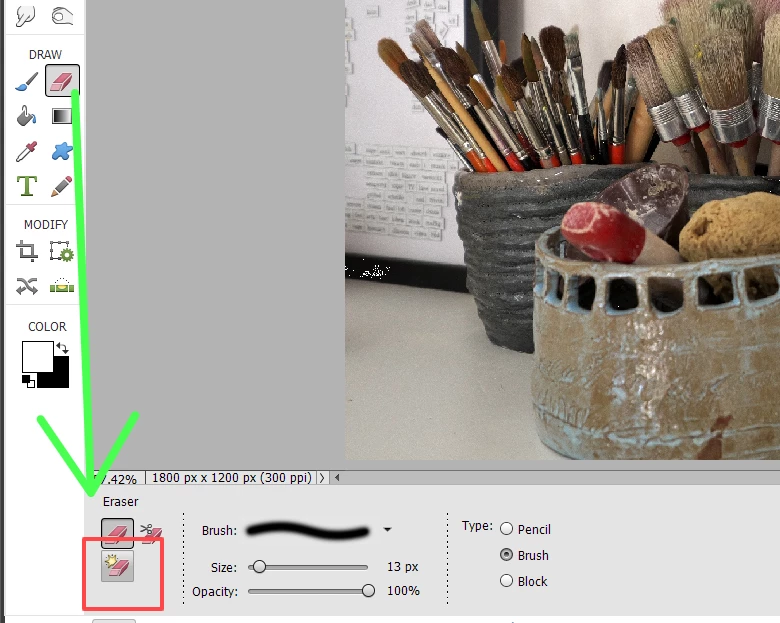
Where did you read that the Magic Eraser is no longer an option? Jeff's suggestion that you be in Expert Mode will help you find the Magic Eraser tool since the default mode when opening the Editor is Quick Mode and the tool is not visible there. If you have not found it yet, click on the Eraser Tool and the Magic Eraser Tool will be in the Tool Options panel at the bottom of the screen.
You haven't told us exactly how you want to use the Magic Eraser tool, but there are several other tools in Elements 2023 that may be more suitable for your needs. The Magic Eraser tool is really only a selection tool. If you were previously using Elements 15, there have been been many advances since then to help you create a selection and use it to delete, the background to isolate the subject. See this HelpX article for further help. In particular, the Subject selection tool and the Auto Selection tool can often make a desired selection with one click or a click-and-drag. You might also want to take a look at some of the Guided Edits, e.g. the Replace Background Guided Edit. And, finally, when you don't know how to do something in Elements or want to find a tool, you can use the Search box on the Home Screen and ask a question in your own words. Several articles and tutorials will then be shown to you.




 AdChoices