
gfbugaboo
Inspiring
January 5, 2025
Answered

How do I backup the catalog structure only in my 2018 Elements Organizer?

  • January 5, 2025
  • 2 replies
  • 444 views

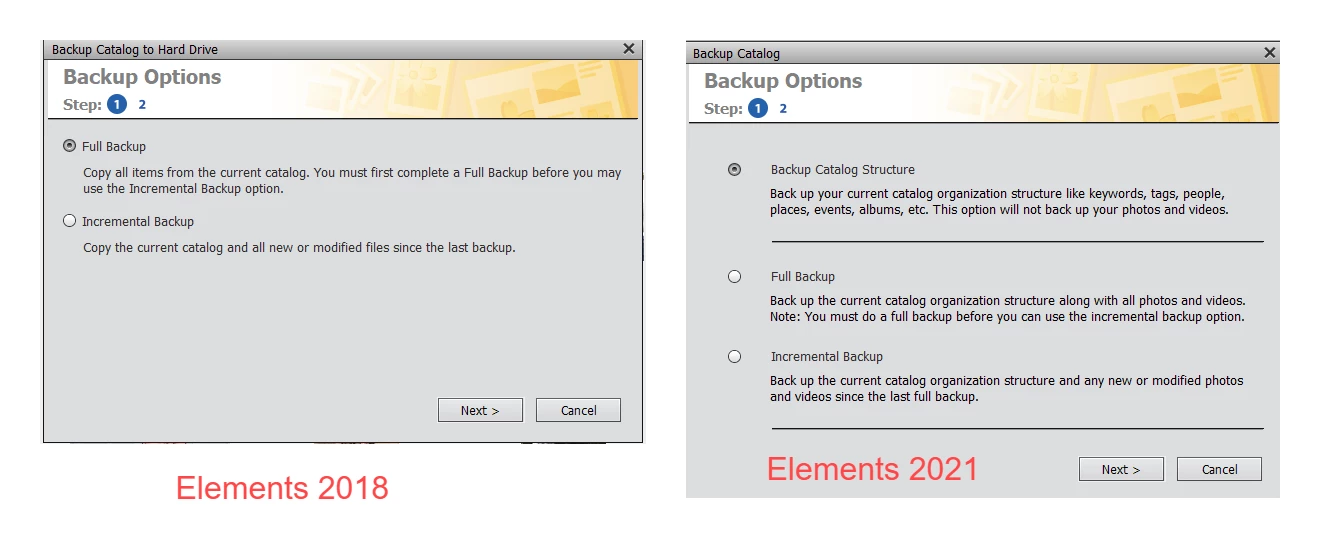
After discovering a bunch of photo folders that were not in my 2018 Elements Organizer, I was about to import some of them when I realized that I’d better back up the current structure, in case I messed something up. According to the help I’ve found on the Web, there should be an option to back up only the catalog structure, which is what I want; the files are already backed up. But when I clicked on Backup Catalog, my only options are Full Backup, which copies the files as well, and Incremental Backup, which would have the same result. All the online information I’ve found on the Organizer applies to more recent versions. Can someone tell me how to back up the catalog structure in the 2018 version?
Correct answer Greg_S.

This feature was introduced in either Elements 2020 or 2021.


However, there is a much easier and faster way to backup the catalog structure.  Simply copy the catalog folder using Windows File Explorer.  The default location is C:\ProgramData\Adobe\Elements Organizer\Catalogs.  If you have moved it, you can find the location under the Organizer's Help>System Info . . .


If you have a very large catalog, I have found that it is much faster to compress the folder and copy a single zipped file to another drive.   Even with the time it takes to zip and unzip the folder, the total time can be reduced. 

2 replies

Greg_S.
Community Expert
Greg_S.Community ExpertCorrect answer
Community Expert
January 6, 2025

This feature was introduced in either Elements 2020 or 2021.


However, there is a much easier and faster way to backup the catalog structure.  Simply copy the catalog folder using Windows File Explorer.  The default location is C:\ProgramData\Adobe\Elements Organizer\Catalogs.  If you have moved it, you can find the location under the Organizer's Help>System Info . . .


If you have a very large catalog, I have found that it is much faster to compress the folder and copy a single zipped file to another drive.   Even with the time it takes to zip and unzip the folder, the total time can be reduced. 

gfbugaboo
gfbugabooAuthor
Inspiring
January 6, 2025

Thank you for that. Five years ago, I might have figured it out for myself, but I've grown old. Regardless, I certainly wouldn't have thought of zipping the folder (it's still pretty big, though).

Glenn 8675309
Legend
January 6, 2025

You have to do a full backup first.

You must perform a full backup before you can do an incremental backup; an incremental backup relies on the information from the previous full backup to identify what has changed and only back up those new or modified files. 

gfbugaboo
gfbugabooAuthor
Inspiring
January 6, 2025

Everything that I've read (mostly from Adobe) says that I should be able to back up just the catalog structure, not every photo and video file in it. Are you telling me that this was NOT available in the 2018 version of the Organizer?