Participant
Jun 1, 2023 11:15 PM UTC
Answered

How do I turn of notifications

MacOS, 2023 Elements


Pops up notifications in the lower left corner every time I run it. How do I turn this off?

Greg_S.
Greg_S.Correct answer
Community Expert
Jun 10, 2023 2:49 AM UTC

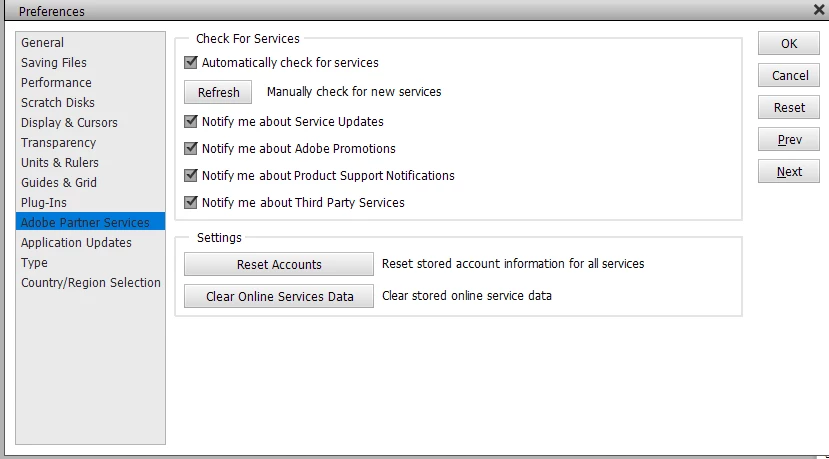
Go to Edit>Preferences>Adobe Partner Services and uncheck all the boxes.  Please let us know if that works for you.

8 replies

Greg_S.
Community Expert
Greg_S.Community ExpertCorrect answer
Community Expert
Jun 10, 2023 2:49 AM UTC

Go to Edit>Preferences>Adobe Partner Services and uncheck all the boxes.  Please let us know if that works for you.

Translate
bjbarouchAuthor
Participant
Jun 10, 2023 3:29 AM UTC

Thank you. That seems promising. It's hard to predict when a new one will pop up, so it will take a day or so of no notifications to confirm. I had hoped that disabling "soft notifications" under General would, you know, disable notifications. It never ocurred occurred to me to look at Partner Services since I don't use any. You are a genuis 🙂 Thank you.

Translate
bjbarouchAuthor
Participant
Jun 10, 2023 7:43 PM UTC

Looking good while editing files today.


Thank you, Greg!

Translate
bjbarouchAuthor
Participant
Jun 9, 2023 4:48 PM UTC

Nothing stops thesse demonic fiends. I can dismiss each one of course, but why do they show up in the first place? They always say something stupid like, "Would you like to learn about <this topic I chose at random that has nothign to do with what you are currently doing>?"

Translate
Greg_S.
Community Expert
Community Expert
Jun 2, 2023 12:10 AM UTC

What kind of pop-up?  If you haven't already done so, try clicking on it once and it should disappear after that.

Translate
Participant
Dec 16, 2023 3:03 AM UTC

I found Edit and Preferences and Adobe Parter Services and unchecked all the boxes, but I still get the pop-ups. Moslty it is "Buy Adobe Photoshop Elements 24."


Translate