Participant
February 17, 2022
Answered

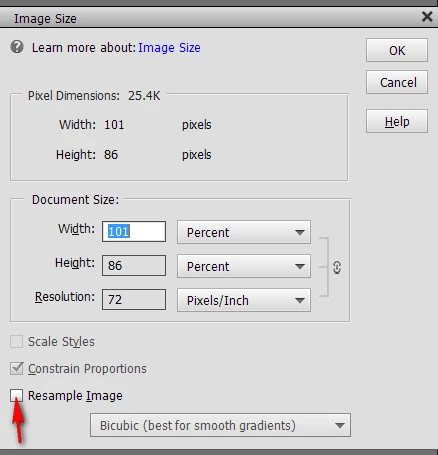
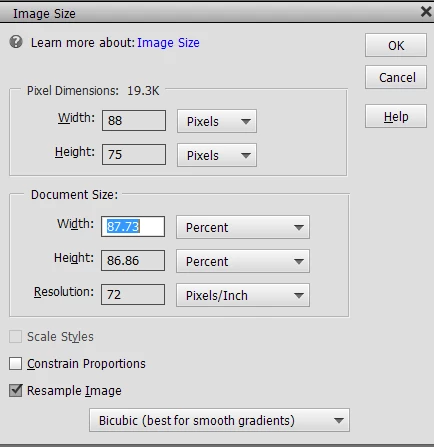
How do I turn off constrain proportions in Photoshop Elements? The box is grayed out.

  • February 17, 2022
  • 2 replies
  • 675 views

How do I turn off constrain proportions in Photoshop Elements? The box is grayed out.

    This topic has been closed for replies.
    Correct answer Peru Bob

    Check "Resample Image."


    2 replies

    Peru Bob
    Community Expert
    Peru BobCommunity ExpertCorrect answer
    Community Expert
    February 17, 2022

    Check "Resample Image."


    Participant
    February 17, 2022
    Thank you SO much! Wonderful. Yay!!
    LinSims
    Community Expert
    Community Expert
    February 17, 2022

    Let me move this to the Photoshop Elements forum for you, which is the appropriate forum for your question.

    The Using the Community forum is for help in using the Adobe Support Community forums, not for help with specific programs, installation issues, or account issues such as subscription questions or billing problems, or generalized questions about Creative Cloud services.

    * Product questions should be posted in the associated product community.
    * Installation questions should be posted in the Download & Install community.
    * Account issues, including subscription questions or billing problems, should be posted in the Account, Payment, & Plan community.
    * Questions about the Creative Cloud desktop app or general questions about apps in the Creative Cloud should be posted to the Creative Cloud Services community.

    Participant
    February 17, 2022

    Okay, sure, the robot-chat put me into this section.  Please put it anywhere you'd like.  I just want an answer, please.  Thank you.