SteveFMJ
Participant
March 3, 2026
Answered

How Do I Turn off the Tools Tips Please?

  • March 3, 2026
  • 3 replies
  • 85 views

hi. I have been trying to turn off those pesky Tool tips in the latest version of PS Elements. All I can find in searches is: Edit- Prefences - Tools. Except Tools isn’t there. Thank you.

    Correct answer Jeff Arola

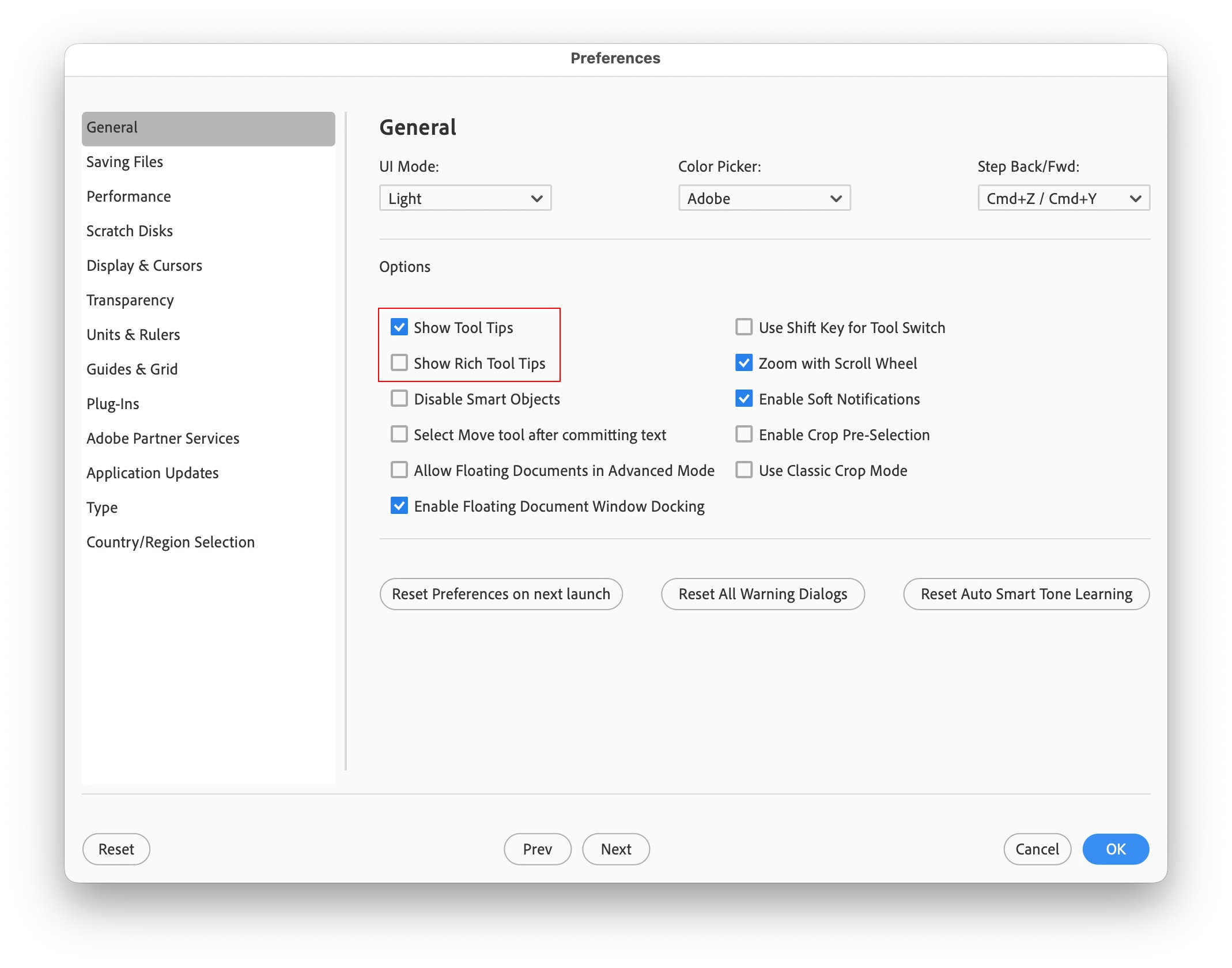
    Go to Edit>Preferences>General 

    On the Mac side its Adobe Photoshop Elements 2026 Editor>Settings>General


    3 replies

    Participant
    May 6, 2026

    After much searching and swearing, tool tips have moved. They don’t want us turning those pesky tips off! It’s now under Photoshop 2026>Settings>Notifications. Under Enable Quiet Mode you’ll see a number of options, Rich Tooltips is there.


    SteveFMJ
    SteveFMJAuthor
    Participant
    March 3, 2026

    Thanks Jeff. That’s sorted it. I thought “General” was just a heading as it’s underlined. 👍

    Jeff Arola
    Community Expert
    Jeff ArolaCommunity ExpertCorrect answer
    Community Expert
    March 3, 2026

    Go to Edit>Preferences>General 

    On the Mac side its Adobe Photoshop Elements 2026 Editor>Settings>General