Participant
Jun 4, 2025 3:27 PM UTC
Answered

How to automatically open PSE 2025 in the Photo Editor Advanced Mode?

I can't work out how to setup this software so that it automatically opens in the Photo Editor Advanced Mode, so I don't have to go through all the intro screens. Can anyone help please?

Mike

Greg_S.
Greg_S.Correct answer
Community Expert
Jun 4, 2025 8:25 PM UTC

There are several ways.  I prefer to pin the Editor's icon to the taskbar:

With the Editor open, right-click on the taskbar icon and select Pin to taskbar from the context menu.  Then simply click on the taskbar icon to launch the Editor.


Alternatively, create a desktop icon shortcut:

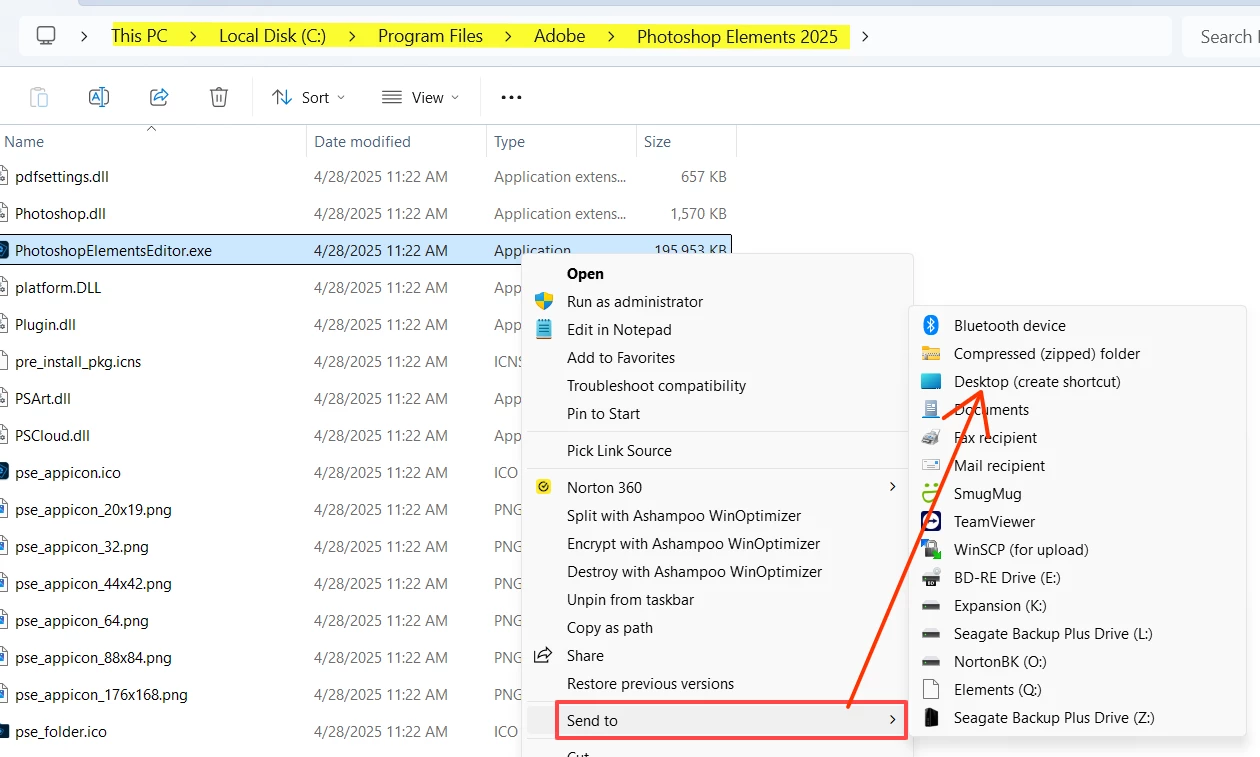
Go to the  C:\Program Files\Adobe\Photoshop Elements 2025 folder and right-click on the file named PhotoshopElementsEditor.exe.  From the context menu, choose Send to>Desktop (create shortcut).  This will place an icon on your desktop which you can rename so as not to confuse with the regular Home Screen icon that is placed by default on installation.  (You may need to first select More Options in the context menu.)


BTW, the choice of Advanced Mode should be sticky.  Is that not happening with your installation?

2 replies

Greg_S.
Community Expert
Greg_S.Community ExpertCorrect answer
Community Expert
Jun 4, 2025 8:25 PM UTC

There are several ways.  I prefer to pin the Editor's icon to the taskbar:

With the Editor open, right-click on the taskbar icon and select Pin to taskbar from the context menu.  Then simply click on the taskbar icon to launch the Editor.


Alternatively, create a desktop icon shortcut:

Go to the  C:\Program Files\Adobe\Photoshop Elements 2025 folder and right-click on the file named PhotoshopElementsEditor.exe.  From the context menu, choose Send to>Desktop (create shortcut).  This will place an icon on your desktop which you can rename so as not to confuse with the regular Home Screen icon that is placed by default on installation.  (You may need to first select More Options in the context menu.)


BTW, the choice of Advanced Mode should be sticky.  Is that not happening with your installation?

Translate
micphAuthor
Participant
Jun 5, 2025 10:00 AM UTC
Thanks very much. A perfect solution.

Mike
Translate

