Spike74
Participating Frequently
April 8, 2023
Answered

How to Custom flip a image

  • April 8, 2023
  • 4 replies
  • 2039 views

Hi

I am trying to find out how I can custom flip a image, prob around 10% to the left or right, but the only flip tool I have in Photoshop 2021 is to  flip horizontal or vertical !.


cheers


Spike

This topic has been closed for replies.
Correct answer Greg_S.

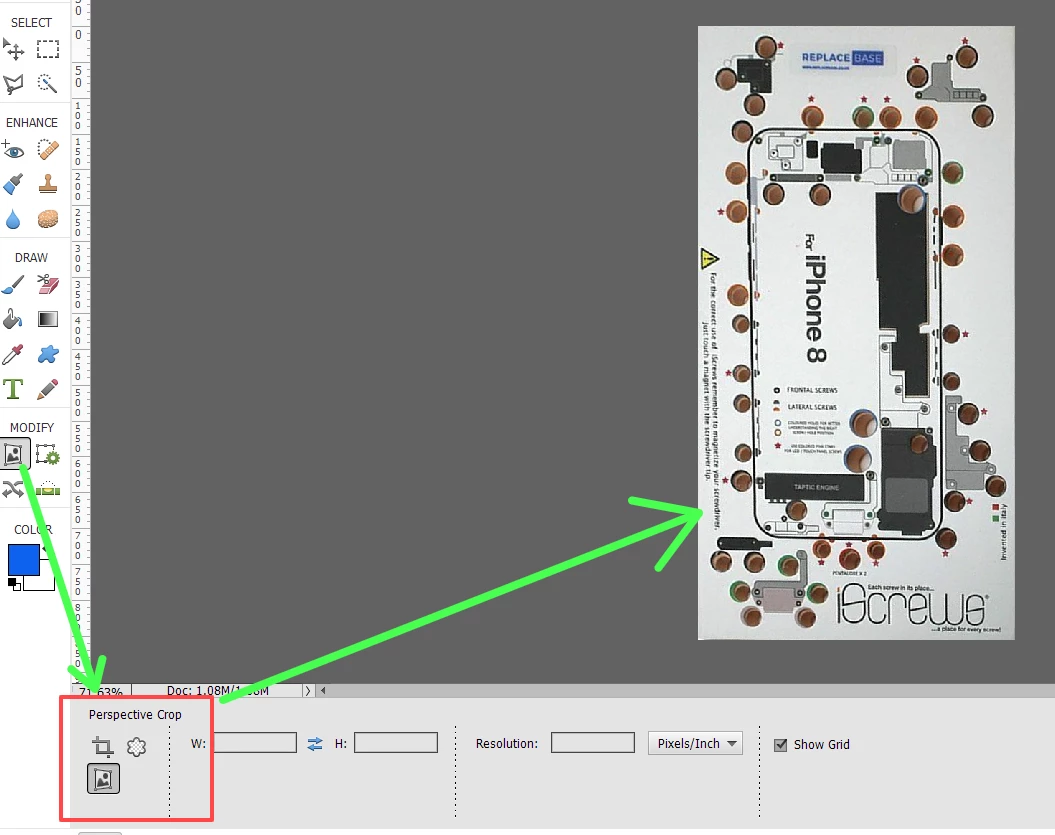
Is this what you want?  If so, use the perspective crop tool.  (Draw a rough rectangle over the image and then move the corner handles to each corner of the rectangular object.)
4 replies

Greg_S.
Community Expert
Community Expert
April 10, 2023

@Spike74 (and any others who may be interested),  Elements 2021 does have the perspective crop tool.  If you click on the regular crop tool (which is the default tool for that position in the toolbar), the Tool Options Bin will show the other available crop tools, including the bottom one which is the perspective crop tool.  In my earlier screenshot, I had already selected that option, so the main toolbar icon also changes to that tool.  In the following sceenshot, I have selected the main crop tool to demonstrate where to find the perspective crop tool. 


Spike74
Spike74Author
Participating Frequently
April 10, 2023

Hi

Thanks for that info.

cheers

Spike

Greg_S.
Community Expert
Greg_S.Community ExpertCorrect answer
Community Expert
April 9, 2023

Is this what you want?  If so, use the perspective crop tool.  (Draw a rough rectangle over the image and then move the corner handles to each corner of the rectangular object.)

Spike74
Spike74Author
Participating Frequently
April 9, 2023

Hi

I don't have the perspective tool in my tool bar !.

cheers

Glenn 8675309
Legend
April 8, 2023

Sounds like you are in quick mode.
Make sure you are in Expert mode.

This is a screenshot of pse 2023 does not make any difference in this issue. 

Spike74
Spike74Author
Participating Frequently
April 8, 2023

Hi

Thanks for your reply,  I can custom rotate , but then I need to twist it slightly left o get it looking straight on  !.

cheers

Spike

cheers

Glenn 8675309
Legend
April 8, 2023

Please post a screen shot of what you're doing..... please don't use your phone to make the screenshot.


Legend
April 8, 2023

I don't think I understand what you are looking for. Flipping is a mirroring, and it can only be around horizontal or vertical lines. If you wanted to mirror around a line 10 degrees from vertical, you could rotate first, flip, then rotate back. There are probably other ways. But you say 10%, not 10 degrees. Don't think I can see what that means.

Spike74
Spike74Author
Participating Frequently
April 8, 2023

Hi

Thanks for your reply, yes meant degrees, attached pic that I want to work on may explain it better, I need to get it face on !.


cheers


Spike

cheers