
Known Participant
December 22, 2023
Answered

How to disable the Add Name circle

  • December 22, 2023
  • 2 replies
  • 264 views

How can I disable the Add Name circle from appearing around the faces of people in my photos.  This has just started happening.  I am using PSE 2023.  I created my own name tags under People Tags when I was using PSE 10 and would prefer to manually apply these tags.
Thanks very much.
This topic has been closed for replies.
Correct answer Greg_S.

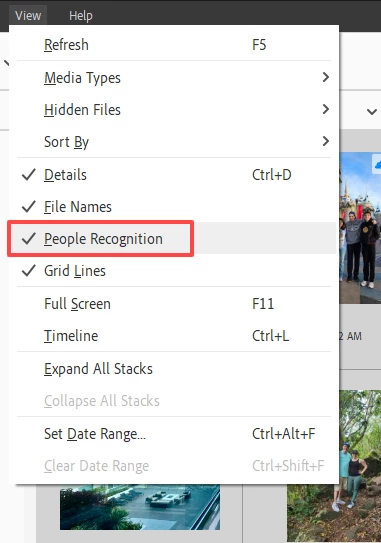
I don't think Glenn's solution will affect images that have already been face recognized.  You need to turn off (uncheck) People Recognition in the View menu. This will avoid the circles popping up when you hover over the image:


2 replies

Greg_S.
Community Expert
Greg_S.Community ExpertCorrect answer
Community Expert
December 23, 2023

I don't think Glenn's solution will affect images that have already been face recognized.  You need to turn off (uncheck) People Recognition in the View menu. This will avoid the circles popping up when you hover over the image:


Jim50Author
Known Participant
December 27, 2023

That worked, Greg!  Thanks so much.

Glenn 8675309
Legend
December 22, 2023

Open ORGANIZER PREFERENCES uncheck all this stuff.  I have photos checked becuase that's what I want.