Participant
March 19, 2020
Answered

how to eliminate the green dominance to 400 photos that are the result of the scanning of old slides

  • March 19, 2020
  • 1 reply
  • 435 views

what to do to apply the same correction to all the photos with a single action

This topic has been closed for replies.
Correct answer 99jon

I would suggest trying the raw editor with a small batch.

File >> Open in Camera Raw

Select all from the left hand filmstrip

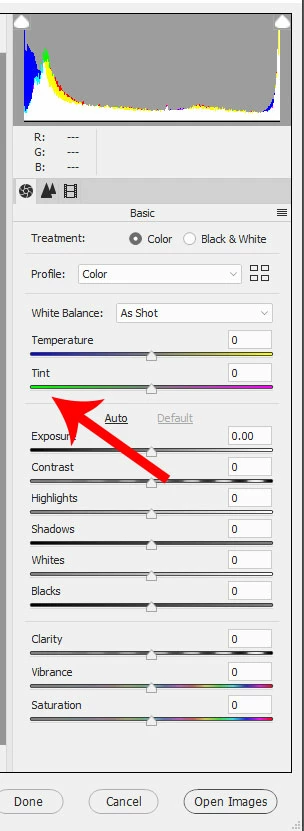
Experiment with the tint slider e.g. magenta is the opposite of green on the color wheel - see image.

You might also try the temperature slider to warm or cool the images.

When done, click the button (bottom-right) “Open Images” to send them into the rgular editing workspace where you can re-save.
1 reply

99jon
99jonCorrect answer
Legend
March 19, 2020

I would suggest trying the raw editor with a small batch.

File >> Open in Camera Raw

Select all from the left hand filmstrip

Experiment with the tint slider e.g. magenta is the opposite of green on the color wheel - see image.

You might also try the temperature slider to warm or cool the images.

When done, click the button (bottom-right) “Open Images” to send them into the rgular editing workspace where you can re-save.

Participant
April 11, 2020

thank you so much for your reply. last but not least: I've a lot of images that has been scanned from slides. most are uncorrectly rotated. question: how can rotate horizontally them quickly, with one shot??

thank you again for your valuable support

regards

PF

Greg_S.
Community Expert
Community Expert
April 11, 2020

If you are using the Organizer, you can select all the files and use the rotation button in the lower tool bar.