Participant
February 22, 2025
Answered

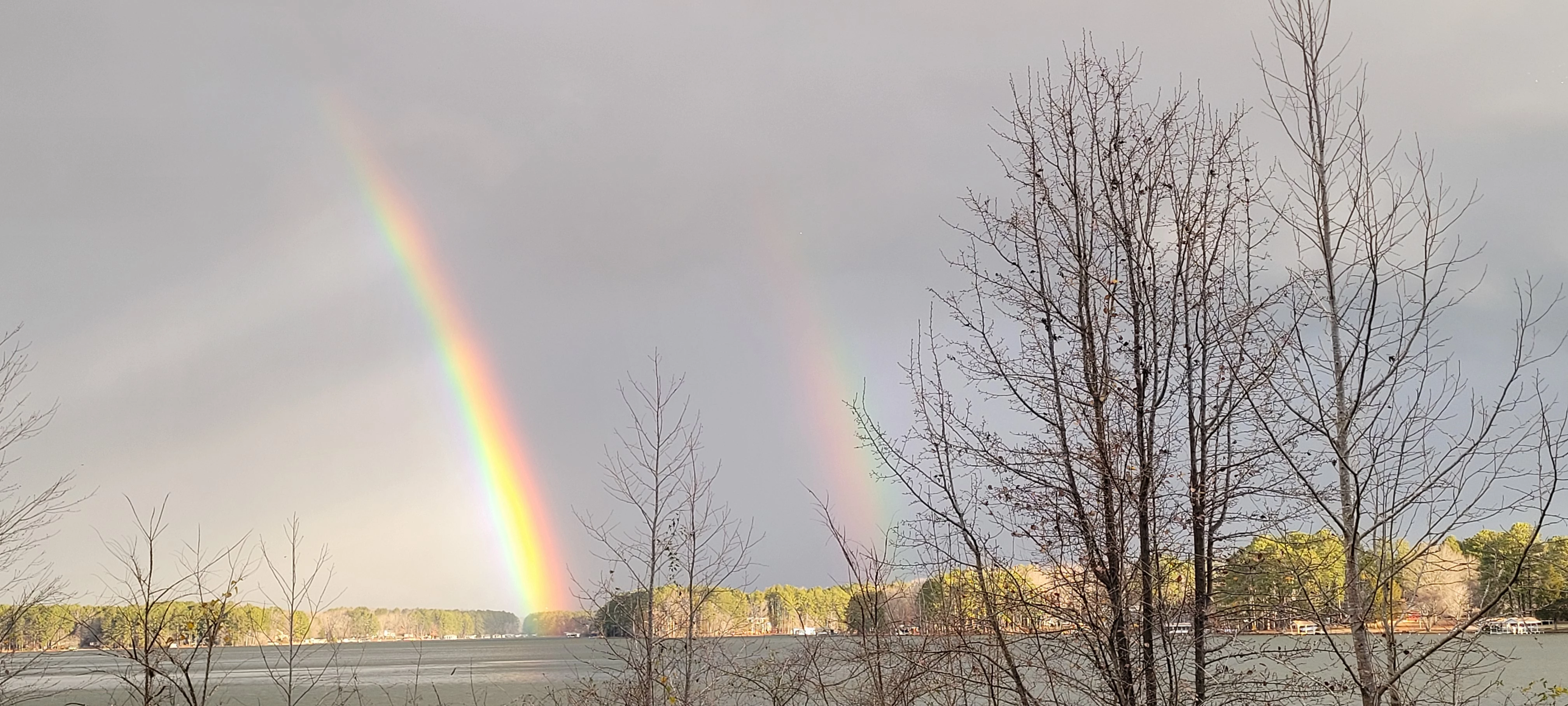
How to enhance 2nd rainbow in photo

  • February 22, 2025
  • 2 replies
  • 372 views

I took a picture of a dual rainbow and would like to enhance the 2nd one.  I am using Elements 2025

2 replies

Peru Bob
Community Expert
Community Expert
February 23, 2025

Another way is to clone part of the first rainbow onto the second one.

Participant
February 23, 2025

At 74, just learning.  Can you explain how to do this.  Would love to give it a try

Greg_S.
Community Expert
Community Expert
February 22, 2025

I'm sure there are several ways to do it.  But here is one:


  • Copy the background layer (Ctrl+J)
  • Go to Layer>New Adjustment Layer>Hue/Saturation and click OK
  • Adjust the Saturation (and Lightness) until the second rainbow suits you.  (Don't worry about  the rest of the photo.)
  • Click on the mask in the adjustment layer.  Press Ctrl+I to invert the mask from white (show) to black (hide)


  • Make sure the foreground color is set to white (Press D)
  • Select a soft brush (Press B and select an appropriate brush)
  • Click on the mask to make sure it is selected (it will be outlined in blue as in the screenshot above)
  • Paint over the second rainbow to reveal the adjustments made to the saturation


You should end up with something like this:


Participant
February 23, 2025

Wow, thanks for the GR8 step by step instructions.  Worked better then I thought it would