Participating Frequently
January 25, 2024
Question

How to fix the blur in the photo

  • January 25, 2024
  • 3 replies
  • 937 views

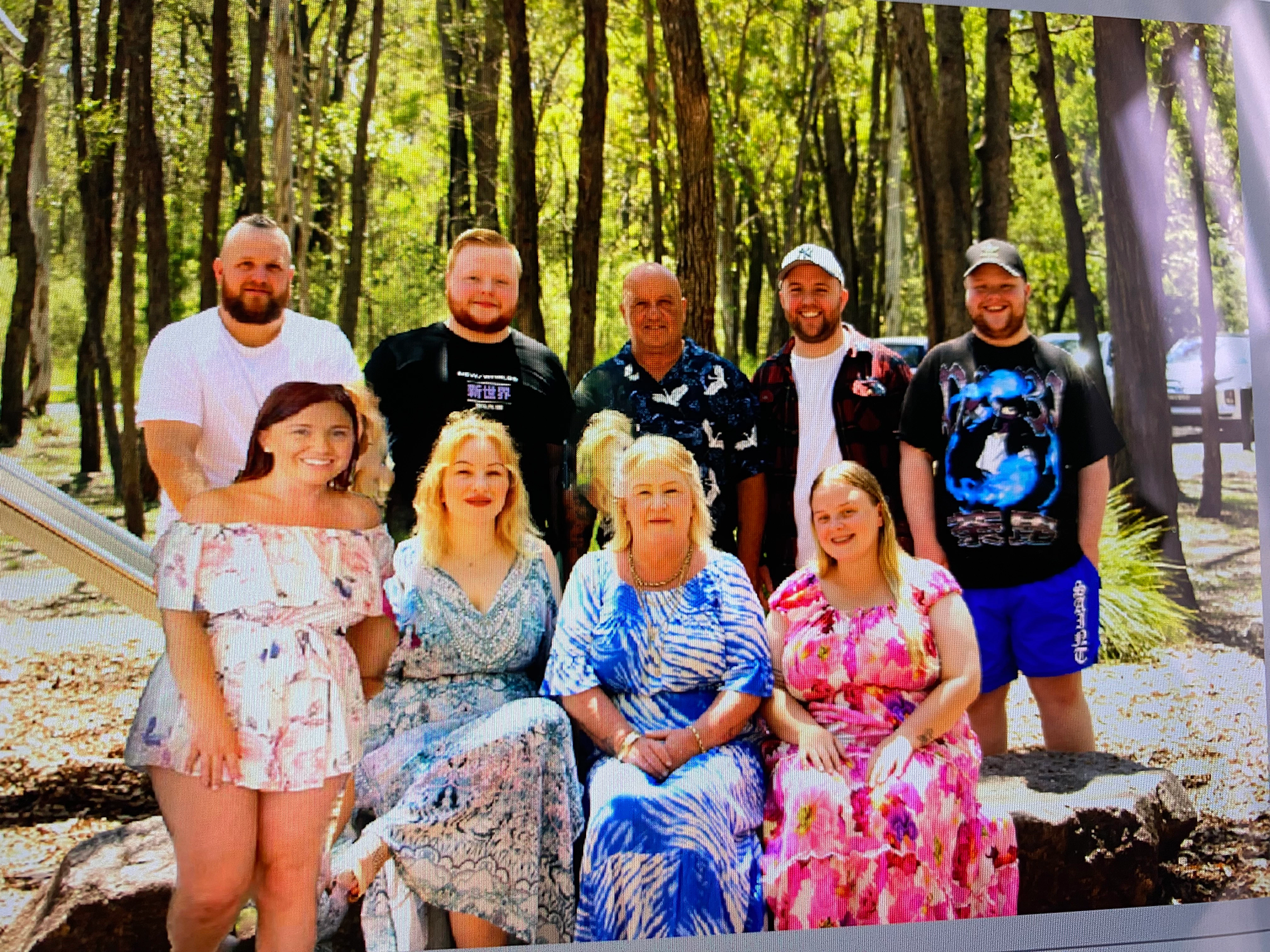
I need some help with fixing the blur in the photo behind the lady in the blue and then the lady on the left. I have attached a photo for reference. Thanks

This topic has been closed for replies.

3 replies

Greg_S.
Community Expert
Community Expert
January 30, 2024

Alicia, it is not clear from your post whether you just want us to fix your photo, or whether you want some advice about how to do it for yourself.  There are a number of problems with combining these two particular photos into a composite, so I will just briefly mention them.

  • The photos have different sizes and the subjects are at different distances from the lens.  In order to combine them realisitically, you need to increase the size of the lady in pink.  As a result, she is not going to be as sharp or in focus as the people in the group photo.
  • The lady in pink is standing but you are trying to include her in the group photo where the ladies are sitting.  @hatstead has done a good job of resolving this problem by putting her next to the standing men.  If you want her to be seated with the women, you may want to crop the lower portion of the photo something like this:


Because of the different poses, it is still a little unnatural, so you could try using the Warp tool to put her into more of a sitting position. (But this is probably too much information for a beginner):


Now, if you want to use this project as a learning experience, I suggest that you look at the Guided Edits that are available to guide you through the tools and the steps that are required to perform various edits.  In this particular case, you could use the Photomerge>Photomerge Compose Guided Edit to combine the two photos.  (This will help demonstrate the different size of the photos mentioned earlier.)


Finally, it's not clear what your last question is:  Now what should I do with the composite photo.  Are you asking how to save the photo posted by hatstead, or are you asking how to save the composite file that you have edited?  If the former, then simply double-click on the photo to open it in a browser window and then right-click where you are given the option to save it to your computer.  If you are asking for your own edited photo, please be a little more specifice.  In general, you are going to go to the File>Save As menu to save the composite as a new file without overwriting the old ones.


I know there is a lot to unpack here.  But you have to start somewhere. 

Peru Bob
Community Expert
Community Expert
January 29, 2024

If you spend a bit more time on isolating the lady on the left in her original photo, you can get a better cutout of her.

Use the dodge tool and burn tool to create the same angle of lighting as the other ladies.

Add a slight blur around her perimeter to help her blend in.


Peru Bob
Community Expert
Community Expert
January 25, 2024

Was the lady on the left in the original picture?

Participating Frequently
January 25, 2024

No the lady on the left was not in the original photo.

hatstead
Inspiring
January 25, 2024

If you post the original picture and the souce picture with the "lady-on-the-left" we may be able to guide you to incorporate her more artfully.