
Inspiring
October 9, 2025
Answered

How to install pse 2026

  • October 9, 2025
  • 2 replies
  • 373 views

I have just bought PSE 2026 Elements and Premiere, and have the notification.  When paying for it I tried to go back to check something, then could not go forward again, so although I have order number and order ID by email, that is it.  How do I upgrade these in Organizer and Editor on 2 computers?  Currently have PSE2025 and used Elements for 20 years. Thank you.
Correct answer 99jon

OK you only need a redemption code if you purchased from a third party. There are separate arrangements for purchases from Amazon.


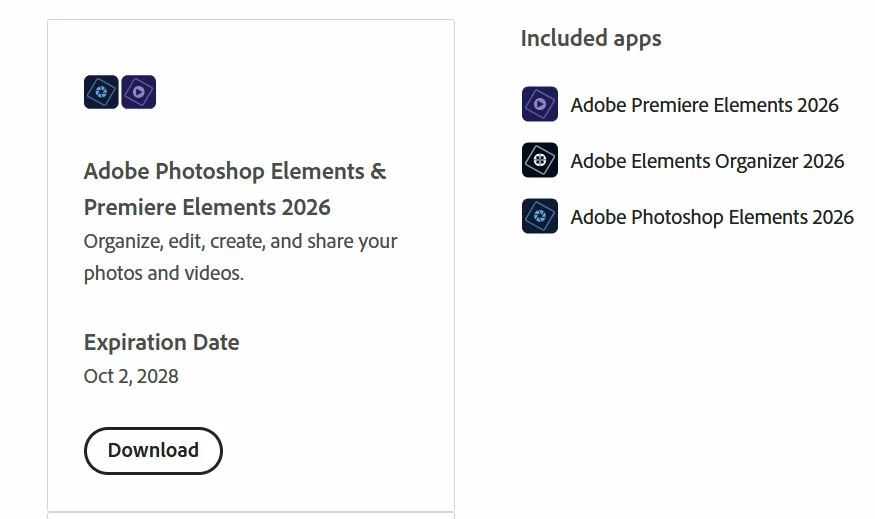
If you purchased directly from Adobe you should be able to install from your account. Go to the products tab and scroll to the bottom of the page. You should see a download button - see image.


https://account.adobe.com/products


2 replies

Inspiring
October 9, 2025

I cannot find my Redemption Code.  The ID number is less than required.


99jon
99jonCorrect answer
Genius
October 9, 2025

OK you only need a redemption code if you purchased from a third party. There are separate arrangements for purchases from Amazon.


If you purchased directly from Adobe you should be able to install from your account. Go to the products tab and scroll to the bottom of the page. You should see a download button - see image.


https://account.adobe.com/products


Inspiring
October 9, 2025

That worked.  Thanks.

99jon
Genius
October 9, 2025

Have you used your redemption code? 


  1.       Visit redeem.adobe.com/elements.
  2.       Sign in to your Adobe account or create an account. Please note that redemption code will be linked to your AdobeID.
  3.       Enter the redemption code and click “Redeem code


That will add the products to your account.  Ensure ypu are signed-in with your Adobe ID and download and install fro this link:

 https://www.adobe.com/products/elements-family/electronic-software-download.html